



























































The DevOps Approach to Data Engineering
Learn how DevOps improves data engineering through automation, testing, CI/CD, and monitoring to create faster, stable, and high-quality data pipelines.


DevOps has transformed the way software is developed and run: teams collaborate, automation replaces repetitive tasks, and code goes from idea to production faster and more securely. These same concepts are changing data engineering today. Teams obtain more dependable data, quicker delivery, and fewer late-night battles when they apply the DevOps method to data pipelines, storage, and analytics, often referred to as DataOps in practice.
I'll give an overview of the DevOps approach to data engineering. You will learn what is important, where to begin, common tools, and immediate, practical steps.
Why DevOps matters for data engineering
Data teams face pain points that look a lot like what software teams used to face: slow releases, weak pipelines, problems that only show up in production, and poor communication between people who build data workflows and those who rely on the data.
Applying this to data engineering addresses these problems by focusing on three things:
-
Collaboration: Data engineers, analysts, data scientists, and operations work together around shared goals and tools.
-
Automation: Repeatable tasks (provisioning infrastructure, running tests, deploying pipelines) are automated so they run the same way every time.
-
Continuous improvement: Monitoring, feedback, and small, frequent changes replace big, risky one-off releases.
Organizations see pipelines that break less frequently, recover more quickly, and offer value sooner when these concepts are applied to data, from ingestion through transformation to serving analytics.
What DevOps brings to data engineering: simple benefits
In practical terms, it approach enhances data engineering in the following methods:
-
Faster delivery: New or fixed pipelines are put into production more quickly because of automation and CI/CD.
-
Better quality: Unintentional data errors are decreased by version control and automated testing.
-
Easier scaling: When data expands, it is easier to expand capacity due to infrastructure in the form of code and templates.
-
Decreased downtime: Automated rollbacks shorten outage times, and ongoing monitoring identifies issues early.
-
Clearer ownership: When teams share accountability for data, problems are resolved more quickly, and knowledge isn't segregated.
Major cloud and platform providers, as well as contemporary data teams, mention similar advantages when they implement it, like data techniques; therefore, they are not confusing promises.
Key concepts you should know
The fundamental concepts that underpin DevOps for data engineering are listed below, along with a brief explanation of each.
Version control for everything
Maintain version control (such as Git) for your pipeline code, SQL, configuration, and infrastructure definitions. That way, every update has a history, modifications can be reviewed before they are released, and earlier versions can be restored if something goes wrong.
Infrastructure as Code (IaC)
Think of infrastructure (VMs, networking, clusters, and buckets) as software. Define it in Git-stored files. This means that you can share the precise architecture with colleagues and repeatedly generate the same environment.
Continuous Integration / Continuous Delivery (CI/CD)
Automate the testing, building, and deployment processes that move a change from a developer's laptop to production. For data, CI/CD may execute sample pipeline runs, verify schema modifications, validate SQL logic, and then deploy orchestrator processes.
Automated testing for data
Test the data as well as the code. Validation ensures schemas meet expectations, row counts fall within a reasonable range, critical columns are empty, and transformations give consistent results are examples of common tests.
Observability and monitoring
Track metrics like pipeline run time, latency, error rates, data freshness, and data quality metrics. Make these visible to the team and set alerts for problems so you can act before users notice.
Small, frequent releases
Deliver frequently and make little adjustments. It is simpler to test, understand, and undo small changes if something goes wrong.
Teams that are updating their data practices see these ideas as useful building blocks. When teaching how to apply this technique to data engineering, leading platforms and manuals stress these similar principles.
A practical step-by-step plan to adopt DevOps for your data team
Use this simple, practical strategy if you're prepared to use this concept but are unsure of where to start.
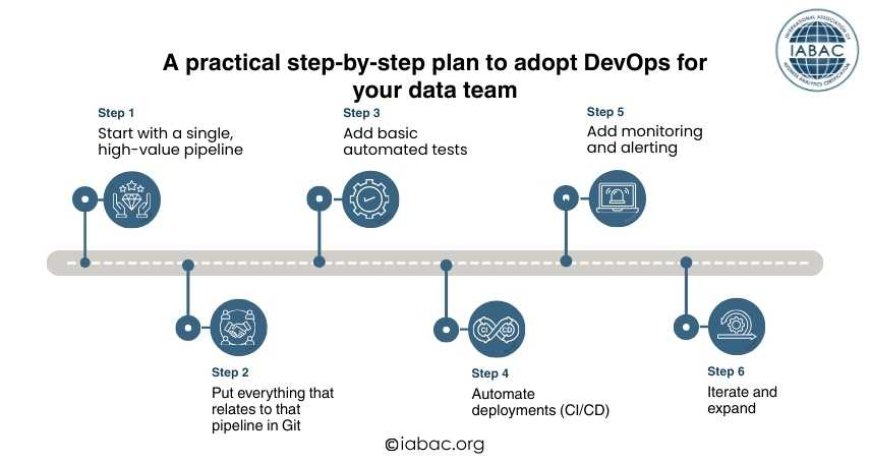
Step 1: Start with a single, high-value pipeline
Select a production pipeline that is significant but not mission-critical, such as a dashboard team's daily enrichment task.
Concentrate there to reduce changes and accelerate learning.
Step 2: Put everything that relates to that pipeline in Git
Move the pipeline code, scheduler definitions, SQL, and configuration into a repository. Add documentation that shows:
-
What the pipeline does
-
Where the source data comes from
-
How to run it locally
-
How to roll back
Step 3: Add basic automated tests
Create a test set that includes:
-
Unit tests for small functions or SQL snippets
-
Data tests that check schema and simple expectations (e.g., primary key uniqueness)
-
A smoke test that runs the pipeline on a small sample dataset
Make the repository run those tests on every change.
Step 4: Automate deployments (CI/CD)
Create a pipeline that:
-
Runs tests on each pull request
-
Packages and deploys pipeline code to staging if tests pass
-
Promotes to production via a gated process or automated rules
Use a CI/CD tool your team already knows (GitHub Actions, GitLab CI, Azure DevOps, Jenkins, etc.).
Step 5: Add monitoring and alerting
Track essential metrics and set alerts:
-
Success/failure of each run
-
Runtime and resource usage
-
Data quality checks (e.g., unexpected drop in row counts)
-
Data freshness SLA
Feed alerts into Slack/Teams and create runbooks for common failures.
Step 6: Iterate and expand
Add another pipeline to the same flow after this one is stable. Continue to learn from problems and enhance automation and testing.
When moving from manual scripts to production-grade pipelines, many teams follow a similar process, and vendor manuals and community blogs offer specific examples for each step.
Concrete practices that make the biggest difference
Below are the specific practices that give the biggest practical wins with the least fuss.
Keep logic in code, not GUIs
Text files include versionable and reviewable code. Consider moving to code-first tools or exporting definitions to files you save in Git if your transformations are defined inside a proprietary GUI without export.
Use parameterized, repeatable environments
Create development, staging, and production environments with IaC or templates. To ensure that tests are useful, make sure "deploy to staging" replicates production behaviour.
Test with realistic samples
Testing on tiny contrived data misses many issues. Use realistic samples that represent edge cases (nulls, duplicates, late-arriving records).
Validate schema changes
One of the main reasons for pipeline breaks is schema modifications. Migration scripts and tests to ensure downstream jobs can handle the change are used to gate schema changes.
Run pipelines under CI
Make your CI runner execute a representative subset of the pipeline on a worker similar to production. This catches runtime issues before deployment.
Make runbooks and playbooks
Keep track of typical mistakes, job restart commands, and rollback procedures. Runbooks should be kept close to the code in the repository.
Because they stop the most frequent failures in production data systems, these practical steps are frequently recommended by cloud platform guides and DataOps practitioners.
Tools Used
You don’t need every tools, start small. Here are common categories and examples.
Version control & code hosting
-
Git (GitHub, GitLab, Bitbucket)
Purpose: store code, run PR reviews, and link CI pipelines.
Orchestration
-
Apache Airflow, Prefect, Dagster, Azure Data Factory
Purpose: schedule and run workflows; visualize dependencies.
Streaming & messaging
-
Apache Kafka, Confluent, Amazon Kinesis
Purpose: move real-time events between systems.
Data processing engines
-
Apache Spark, Flink, cloud managed services (Databricks, EMR, BigQuery)
Purpose: large-scale processing and transformations.
CI/CD
-
GitHub Actions, GitLab CI, Jenkins, Azure Pipelines
Purpose: run tests, package artifacts, and deploy to environments.
Infrastructure as Code
-
Terraform, CloudFormation, Pulumi
Purpose: define and manage cloud resources as code.
Datawarehouses / Lakes
-
Snowflake, BigQuery, Redshift, Delta Lake
Purpose: store and serve curated data for analytics.
Data quality and observability
-
Great Expectations, Monte Carlo, Datadog, Prometheus, Grafana
Purpose: assert data correctness and track pipeline health.
Measuring success: what to track
When you apply DevOps to data, track metrics that show improvements in reliability and speed. Examples:
-
Deployment frequency: How often pipeline code is promoted to production.
-
Mean time to recovery (MTTR): How quickly you restore a failing pipeline.
-
Data failure rate: Percentage of runs that fail data quality checks.
-
Data freshness/latency: How old the “latest” data is compared to when it should be available.
-
Time to onboard new data source: How long it takes to connect, ingest, and make a new dataset usable.
These metrics keep teams focused on what matters: delivering accurate, timely data to users. Many enterprise guides and blogs call out similar KPIs as primary indicators of DataOps maturity.
Where DevOps and DataOps overlap and where they differ
The terms DevOps and DataOps are close cousins. They share automation, CI/CD, and collaboration. Still, there are sensible differences:
-
DevOps: Focused on software delivery; tests and CI ensure code correctness and deployment safety.
-
DataOps: Focused on the flow and quality of data; it adds data-specific concerns like schema management, lineage, and data quality testing.
How to scale DevOps practices across your data organization
Once you’ve proven the approach on a few pipelines, spread the practices thoughtfully.
-
Create templates and shared libraries for common patterns (testing, logging, deployment).
-
Build guardrails with reusable IaC modules so teams don’t reinvent cloud setup.
-
Train teams on code review, testing, and runbook creation — make these skills part of onboarding.
-
Form a data platform team to own shared services, tooling, and best practices.
This combination reduces duplicated effort and lets individual teams focus on business logic and domain knowledge.
The future: trends to watch
A few trends are shaping how DevOps meets data engineering:
-
Tighter CI/CD for data: More pipelines will run meaningful tests under CI before deployment.
-
Platformization: Centralized data platforms provide easier self-service for teams while keeping governance tight.
-
Observability for data: Richer lineage, data quality, and SLA tracking tools will become standard.
-
Unified pipelines: Streaming, batch, and model deployment will be treated as parts of the same supply chain.
This technique does not need to be significantly transformed to be applied to data engineering. Start small, test your data, automate the long and dangerous processes, and let the team know about any issues.
Version control, IaC, CI/CD, testing, monitoring, and clear ownership are all practical actions that can help you minimize outages, deliver insights more quickly, and free up your team to address real-world problems.
Professionals looking to improve their data engineering practice can explore formal training or certification to supplement practical skills. One simple suggestion is the Data Engineer certificate, which can be used to verify practical, employable data engineering skills.