






















































Power BI Course Duration and Fees
Get clear details on Power BI course lengths and costs, with info on program durations, pricing options, and value-packed choices for all skill levels.

If you're considering learning Power BI, it's important to understand how long it will take and how much it will cost. Whether you're looking to become a data analyst or want to improve your skills, knowing these details can help you make the right choice for your learning journey.
Power BI: Microsoft's Data Analysis Revolution
Power BI, developed by Microsoft, is a leading business analytics tool revolutionizing data analysis. With its intuitive interface and powerful features, it enables users to visualize and dissect data effortlessly. This accessibility has propelled its adoption across industries, empowering businesses to extract actionable insights swiftly. As organizations increasingly recognize the importance of data-driven decision-making, Power BI's prominence continues to surge, cementing its position as a cornerstone tool for effective data analysis and interpretation.
Main Features of Power BI
-
Power BI Desktop: A free program for Windows that helps users create reports and data models. It’s where you can design and build visual reports before sharing them.
-
Power BI Service: A cloud platform where you can publish, share, and collaborate on reports and dashboards. It works on any device and updates in real time.
-
Power BI Mobile: Apps for iOS and Android that let you view and interact with your reports on the go.
-
Power BI Gateway: A tool that connects your local data sources (like databases) to the cloud, making sure your reports have up-to-date information.
-
Power BI Report Server: An on-premises server for hosting and managing reports, both from Power BI and other types of reports.
-
Power BI Embedded: A service for developers to add Power BI reports directly into their own apps.
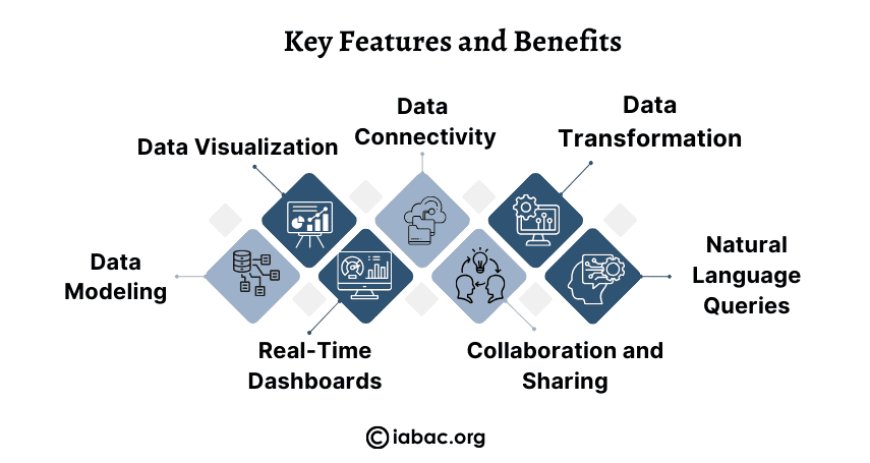
Key Features and Benefits
-
Data Visualization: Power BI offers many options for visualizing data, from bar charts to maps. You can even customize your own visuals.
-
Data Connectivity: You can connect Power BI to a variety of data sources, like databases, Excel, and cloud services such as Google Analytics and Salesforce.
-
Data Transformation: Power BI’s Power Query Editor lets you clean and prepare your data before you use it. You can filter, merge, and change the format of your data easily.
-
Data Modeling: You can link data from different tables, create custom columns, and use formulas (called DAX) to analyze your data more deeply.
-
Real-Time Dashboards: Power BI lets you set up dashboards that update automatically as new data comes in.
-
Collaboration and Sharing: You can share your reports and dashboards with others, and control who can see or edit them.
-
Natural Language Queries: You can ask Power BI questions like "What were our sales last month?" and it will automatically create the right chart or report.
How Power BI Works
-
Data Import: Start by importing data from sources like Excel files, cloud services, or databases.
-
Data Modeling: After importing, you set up relationships between tables, create custom fields, and use formulas to analyze the data.
-
Report Creation: Next, you build visual reports by dragging and dropping data into different charts and visuals.
-
Publishing and Sharing: Once your report is ready, you can publish it to Power BI Service and share it with others.
-
Collaboration: You can allow others to access or edit your reports, and you can set up permissions to control who can do what.
Why Choose Power BI
-
Easy to Use: Power BI is user-friendly, even for people without a technical background. Its drag-and-drop interface makes it simple to create reports.
-
Integration with Microsoft Tools: If your organization already uses Microsoft tools like Excel or SharePoint, Power BI works seamlessly with them.
-
Affordable: Power BI offers free basic features, and its paid versions are affordable compared to many other analytics tools.
-
Real-Time Data: You can set up dashboards that update automatically as new data comes in.
-
Scalable: Power BI works for businesses of all sizes, from small companies to large enterprises, handling everything from small datasets to big data.
Power BI vs. Other Tools
Power BI competes with other business intelligence tools like Tableau, QlikView, and Google Data Studio. Here's how Power BI stacks up:
-
Tableau: Tableau offers advanced visualizations but is more expensive. Power BI is more affordable and integrates better with Microsoft products.
-
QlikView: QlikView is known for its flexible data exploration, but Power BI is easier to use and more cost-effective.
-
Google Data Studio: Google’s free tool is good for small businesses, but Power BI offers more customization, better data connectivity, and is more scalable.
Decode Course Suitability
Power BI courses can be daunting for prospective learners, as they are confronted with a multitude of options, each offering varying durations and associated fees. This diversity often breeds confusion and uncertainty, making it arduous for individuals to discern the course that aligns perfectly with their learning objectives. With numerous choices available, selecting the most suitable Power BI course requires careful consideration and evaluation of factors such as duration, fees, and curriculum comprehensiveness.
So, how long does a typical Power BI course last, and what are the fees involved? Let's break it down to provide a clearer understanding.
The duration of a Power BI course can vary depending on several factors, including the level of proficiency desired and the mode of instruction. Typically, Power BI courses are available in various formats, including
Online Courses
Online Power BI courses provide flexibility and convenience, catering to learners' diverse schedules and commitments. Typically structured with pre-recorded lectures, interactive assignments, and quizzes, these courses offer a self-paced learning experience. The duration varies, spanning from a few weeks to several months, contingent upon the curriculum's depth and the learner's time availability. This format empowers individuals to delve into Power BI at their rhythm, ensuring a comprehensive understanding of the subject matter while accommodating their personal and professional responsibilities.
In-Person Workshops
In-person workshops offer an attractive learning environment, fostering immersive experiences where participants engage in hands-on exercises and analyze real-world case studies under the guidance of experienced instructors. These workshops typically span a few days to a week, providing intensive training in Power BI concepts and techniques. Through interactive sessions and direct interaction with instructors, attendees gain practical insights and skills that are immediately applicable in their professional endeavors. This format not only enhances understanding but also cultivates a collaborative learning atmosphere conducive to skill mastery.
Certification Programs
Certification programs in Power BI are tailored to assess and validate individuals' proficiency in the tool. These programs encompass a series of modules that delve into diverse aspects of Power BI, preparing candidates for a certification exam. The duration of these programs varies, spanning from a few weeks to several months. The variability in duration is contingent upon the program's structure, depth of content, and prerequisites. Participants undergo comprehensive training, equipping them with the necessary skills and knowledge to excel in utilizing Power BI for data analysis and visualization.
Fees
As for the fees associated with Power BI courses, they can also vary significantly depending on the course provider, format, and duration. Online courses tend to be more affordable, with fees ranging from $100 to $500 or more, depending on the depth of the content and additional resources provided.
In-person workshops and certification programs may have higher fees, ranging from $500 to $3000 or more, depending on the duration and prestige of the program. Some organizations offer discounts or scholarships for certain demographics, so it's worth exploring these options to mitigate costs.

Action
Before enrolling in a Power BI course, it's essential to consider your learning objectives, budget, and preferred learning style. Research different course providers, read reviews, and compare course curricula to find the best fit for your needs.
Additionally, inquire about any prerequisites for the course and ensure that you meet them before signing up. Taking the time to thoroughly evaluate your options will help you make an informed decision and maximize the value of your investment in a Power BI course.
Specialized Training Providers
Certain platforms and institutions specialize in Power BI training, offering courses curated by industry experts. These programs often focus on the practical application of Power BI in specific sectors such as finance, healthcare, or marketing. The duration of these specialized courses can vary, providing targeted insights and skills relevant to niche domains.
Corporate Training Programs
For organizations looking to upskill their teams, many training providers offer corporate training programs in Power BI. These programs are often customizable to address the specific needs of a company. The duration and fees are tailored based on the scope of the training and the number of participants. Corporate programs aim to enhance the collective data analysis capabilities within an organization, promoting a unified approach to utilizing Power BI tools.
Free Resources
In the expansive field of virtual education, free resources for learning Power BI are also available. These include tutorials, webinars, and community forums. While these resources may not offer a structured course with certification, they can be valuable for individuals seeking introductory knowledge or supplementary learning. The flexibility of these resources allows learners to explore Power BI without a financial commitment.
Industry Recognition
Consider the industry recognition associated with the Power BI course you choose. Some programs may have partnerships with leading tech companies or accreditation from industry bodies. Recognized courses can add credibility to your skills and may be preferred by employers.
Continuous Learning
The field of data analysis and visualization is bright, with continuous updates and advancements. When selecting a Power BI course, it's prudent to choose one that emphasizes continuous learning. Courses that provide updates on new features, industry trends, and best practices ensure that your skills remain relevant and up-to-date in a rapidly shifting environment.
Refer to these Blogs:-
Understanding Power BI Components: A Complete Guide
Understanding the Basics: What Is Business Analytics?
Understanding the duration and fees of Power BI courses is vital for professionals seeking to enhance their data analytics skills. Courses vary in duration and cost, offering flexibility to accommodate diverse learning preferences and budgets. By thoroughly researching options, aligning with personal objectives, and considering industry recognition, individuals can make informed decisions to propel their careers forward in the active domain of data analysis.