




















































Google’s AI Mode Is Here: Just Tap, Circle, and Learn
Explore Google’s new AI-powered Circle to Search feature—just tap, circle, and get instant info without switching apps.

Introduction
Think about the last time you had a question while watching a video, playing a game, or scrolling through a product online. You probably paused, switched apps, and typed it into Google. That little back-and-forth break? Google wants to get rid of it.
With two new tools—AI Mode and Circle to Search—Google is changing the way we search. It’s more natural, quicker, and you don’t have to stop what you’re doing.
What is AI Mode in Google Search?
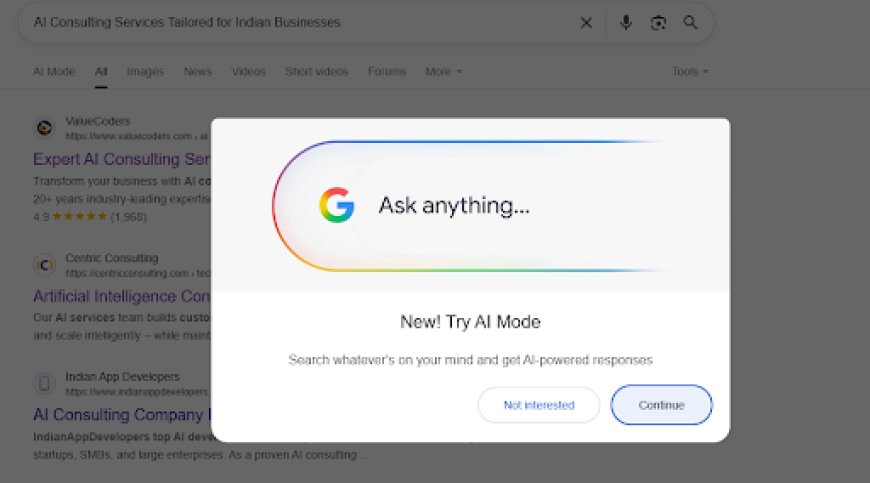
AI Mode is a new feature in Google Search powered by Gemini, Google’s advanced AI model. It’s designed to change how search results are delivered. Instead of showing a list of links that require users to sift through pages to find answers, AI Mode gives summarized, direct responses right at the top.
What makes AI Mode stand out?
-
Quick Overviews: These AI-generated summaries pull information from various trusted sources and present it in a clear, concise form.
-
Chat-Like Follow-Ups: Want to dig deeper? Just ask. AI Mode remembers the context, so you can keep the conversation going.
-
Use Voice, Text, or Photos: Whether you’re typing, talking, or using an image, AI Mode can understand what you're asking.
-
Know Where It Comes From: Citations are included. AI Mode lists the sources of its summaries, so you can verify and read more.
-
Global Rollout: First available in the U.S., AI Mode is now reaching other countries like India, especially on Android devices.
This is Google leaning into generative AI and making search smarter and more conversational.
What is Circle to Search?
Circle to Search is a new way to search on Android phones without leaving the app you're using. Instead of switching to the Google app or your browser, you just press and hold the home button or navigation bar, and then:
-
Circle
-
Highlight
-
Tap
-
Scribble
…on anything on your screen to instantly search it.
You don’t need to copy and paste or type anything. Just use your finger to point out what you’re curious about, and Google takes it from there.
Why Circle to Search Feels New and Useful
-
No More App Switching: You can stay in your current app—like Instagram, YouTube, TikTok, or a game—and still ask questions or look up information.
-
It Understands What You See: Whether it’s a sneaker in a video, a recipe ingredient, or a word in another language, you can point at it and get related results instantly.
-
Works with AI Mode: After circling something, you’ll see an option to “Ask with AI.” Tap it to get a full explanation or helpful answer in a chat-style format.
-
Supports Many Languages: It’s designed to work in different languages and is available in countries like India.
In short, it makes exploring online feel smoother. Instead of stopping what you’re doing to go search, you just explore right in the moment.
For Gamers: Real-Time Help Without Pausing the Game
Mobile games are fun, but getting stuck in the middle of a level can be annoying. Now, with Google’s new tools—AI Mode and Circle to Search—you can get help without pausing or closing your game.
Here’s how it helps:
-
Instant Info: Not sure about a character, item, or weapon in the game? Just highlight it, and you’ll get its name, what it does, and tips on how to use it.
-
Level Help: The AI knows where you are in the game and can give you tips or steps to beat that exact level.
-
Watch and Learn: It can also show YouTube videos of that same part of the game so you can follow along while you play.
-
No Interruptions: You don’t have to stop the game or open another app. Everything happens right there on your screen.
Whether you play games for fun or take them seriously, this makes things easier and keeps the fun going without breaks.
Smarter, More Natural Search for Everyone
These days, we don’t use our phones one thing at a time. We might be watching YouTube, texting a friend, and checking out a product—all at once. Google’s new tools are made for this kind of multitasking.
Here’s what makes them useful:
-
Search the Way You Talk: You don’t have to type perfect questions. Just speak or type like you’re talking to a friend.
-
Search What You See: If something’s on your screen—a word, an object, a person, or a place—you can use Circle to Search to look it up.
-
Keep Going Without Stopping: Whether you’re watching a video or reading something, you can get more info without leaving what you’re doing.
-
Go Deeper into a Topic: With AI Mode, you can ask follow-up questions to learn more, step by step.
This kind of search is not just about finding answers. It’s about making the search fit how we think—fast, curious, and visual.
What This Means for Marketers and Content Creators
If you create content or do digital marketing, it’s time to shift your strategy. The old way—just focusing on keywords and rankings—isn’t enough anymore. With AI Mode and visual search becoming more common, you need to think differently.
Here’s what to work on:
-
Be Part of AI Summaries: People might not click your link, but your content could be used in an AI-generated answer. So focus on writing helpful, clear, and accurate content.
-
Organize Your Content Well: Use headings, bullet points, and proper formatting so AI can easily understand and pick out key information.
-
Write Like You Talk: AI prefers content that sounds like a real conversation. Keep your tone natural and easy to follow.
-
Use Better Images: Since Circle to Search is visual, make sure your images are clear, relevant, and include good descriptions (alt text).
-
Keep It Fresh: AI looks for recent information. Old or outdated content may not show up.
-
Answer Specific Questions: People now search using full questions. Create content that covers detailed, long-form queries—not just broad topics.
In short, make your content more helpful, more visual, and more natural. That’s how you stay visible in this new AI-powered search world.
How You Can Use It in Everyday Life
These tools aren’t just fancy features—they’re actually useful in your day-to-day life.
Here are some examples:
-
Watching a Travel Video? Circle a place you see, and get travel info like tips, weather, or local news.
-
Reading the News? See a name you don’t know? Highlight it and ask AI for more details.
-
Shopping Online? Spot a product in a video or post? Use Circle to Search to find its price and reviews.
-
Learning Something New? Watching a tutorial and stuck on a word or step? Highlight it to get a quick explanation.
All of these small actions make searching feel easier, faster, and more natural—without stopping what you're doing.
Your Privacy and Control Still Matter
Even with all these smart features, Google gives you control over your data and settings:
-
Search History: You can check what you’ve searched, delete it, or manage it anytime.
-
Safe Search: Filters for harmful or adult content still work, even in AI Mode.
-
See the Sources: Google shows where the AI is getting its answers from, so you know it’s reliable.
-
Turn Off Features: If you prefer the old way of searching, you can switch some features off.
Google understands that people need to trust AI. That’s why these privacy controls are built in to keep you in charge.
What’s Coming Next in Google Search
These new features are just the start. Here’s what we might see in the future:
-
Works on More Devices: Circle to Search could be added to more Android phones and maybe iPhones too.
-
Smarter Personalization: Search might learn what you like and show results that fit your needs better.
-
Understands More: Future updates may notice how you say things—like if you sound urgent or emotional—and respond more helpfully.
-
Better Video Help: AI might work inside videos too, helping with shopping, learning, or finding info as you watch.
-
Gemini in More Places: Google’s Gemini AI could show up in other apps and tools, not just in search.
Want to Learn More About AI?
If you find these new AI tools interesting, it might be a good time to learn how AI really works—and how it can help you in your career.
You can start with IABAC (International Association of Business Analytics Certifications). We offer beginner-friendly and job-focused courses in AI, machine learning, and data science.
-
Learn more here: IABAC
-
Ready to dive in? Check out: Artificial Intelligence Certification
These certifications are a great way to get real skills and understand how AI is used in the real world.
A New Way to Search and Learn
Google’s AI Mode and Circle to Search are changing how we search. You don’t need to switch between apps or type long questions anymore. Now, you can get answers right when and where you need them.
-
For content creators and marketers: It’s time to adapt to a smoother, AI-powered search experience.
-
For everyday users: You get faster and smarter help, without any extra steps.
Whether you’re a gamer needing tips, a shopper checking out a product, or someone curious about something you saw—these tools make it easy to get the info without interrupting what you’re doing.