























































What Is a Convolutional Neural Network?
Learn what a Convolutional Neural Network (CNN) is, how it processes visual data, and why it's used in image recognition and deep learning.


Understanding images is something we’re naturally good at.
You can glance at a photo for a moment and instantly recognize edges, shapes, colors, objects, and even emotions. Your brain processes all of this so quickly and effortlessly that you barely notice the work it’s doing.
Computers, however, don’t “see” anything at all.
To them, an image is just a huge collection of numbers and pixel values arranged in rows and columns. A machine doesn’t naturally recognize a face, a car, or a road. It has to learn how to make sense of these numbers and understand the patterns hidden inside them.
This is where Convolutional Neural Networks (CNNs) come in.
CNNs are the reason modern AI can:
-
identify people in your photo gallery,
-
spot diseases from medical images,
-
help self-driving cars understand the road,
-
and let you search for products just by uploading a picture.
They give machines a way to interpret visual information almost like we do.
1. The Problem CNNs Solve
Traditional neural networks treat every pixel independently.
Imagine flattening an image into one long line of numbers—you lose the relationships between pixels.
For example:
-
A cat’s ear is connected to the cat’s head
-
A road lane continues across the image
-
A tumor has a specific texture pattern
These spatial relationships matter.
A standard neural network destroys them by flattening the data.
CNNs respect spatial structure.
They understand that pixels close together form patterns—edges, curves, textures, shapes—just like your visual system.
They do this using layers built specifically for images.
2. CNN Architecture
Below is the first image (Style A: Technical diagram) showing the classical architecture of a CNN:
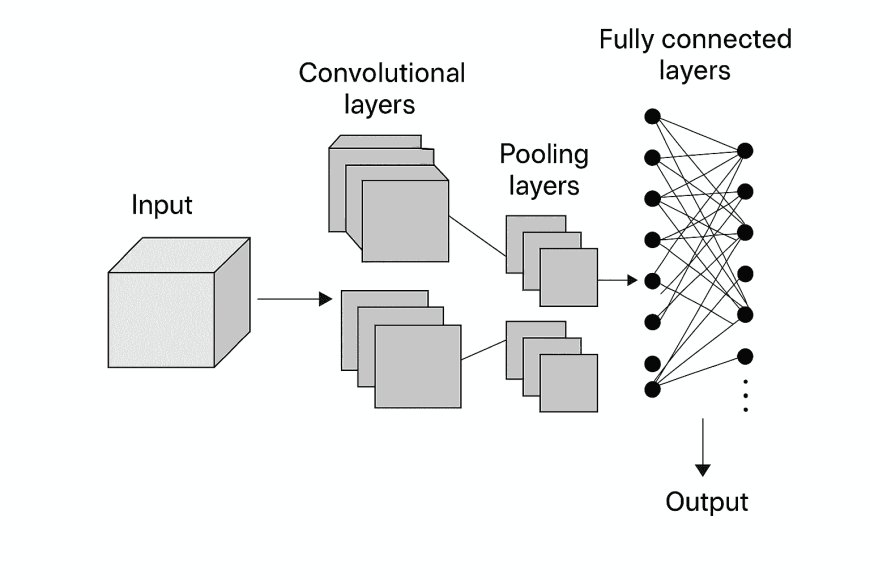
This diagram shows the main blocks:
-
Input
-
Convolutional layers
-
Pooling layers
-
Fully connected layers
-
Output
Let’s break each part in detail in a conversational yet professional way.
3. Input Layer How an Image Enters a CNN
Before a Convolutional Neural Network learns anything, the data must pass through the Input Layer.
This is where the model receives the raw image exactly as it is not as shapes or objects, but as numbers arranged in three dimensions.
Think of an image as a 3D block of data.
Every image has:
-
Height → number of rows of pixels
-
Width → number of columns of pixels
-
Depth → number of color channels (usually Red, Green, Blue)
So, a standard color image becomes:
256 × 256 × 3
That means:
-
256 pixels tall
-
256 pixels wide
-
3 layers stacked on top of each other, each representing how much Red, Green, and Blue exist at every pixel location
Each pixel in these layers carries a value between 0 and 255, representing brightness or intensity.
For example, a single pixel might look like:
-
R = 134
-
G = 89
-
B = 210
But even though you might look at the image and instantly recognize a face or a dog, CNN does not.
To the network, the image is just a structured block of numbers.
It doesn't see:
-
a tail
-
an eye
-
a building
-
a tumor
-
a face
It only sees patterns in pixel intensities.
At this stage, CNN is basically “blind.”
The input layer acts only as a gateway, passing raw numerical data into the deeper layers where learning actually begins.
This is where the magic starts.
Once the image enters the network:
-
Convolution layers begin scanning it with filters
-
Edges and textures start to appear
-
Patterns begin to form
-
Meaning slowly emerges
The input layer is the simplest part of the CNN but it’s also the foundation.
Every deeper understanding the network builds begins with this structured 3D block of pixels.
4. Convolution Layer: How a CNN Learns Patterns
Here is the second technical diagram (Style A):
A visual representation of how convolution filters slide over the image:

A convolution layer is the heart of a CNN.
This is where the network learns visual features.
How it works (simple explanation):
Imagine placing a small square window—say 3 × 3—on top of the image.
This window is called a filter or kernel.
You slide this filter across the image, one step at a time (called stride).
At each position:
-
The filter multiplies its values with the corresponding pixel area
-
Adds the results
-
Produces a single number
Doing this across the whole image produces a feature map.
What does a feature map represent?
It highlights where a specific pattern exists, such as:
-
edges
-
curves
-
textures
-
color transitions
-
corners
Each filter learns a different feature.
The deeper the network goes, the more abstract these features become.
Early layers → simple edges
Middle layers → shapes
Deep layers → object parts (eyes, wheels, ears)
5. Activation Function Adding Nonlinearity
After convolution, the model applies an activation function, usually ReLU (Rectified Linear Unit):
ReLU(x) = max(0, x)
ReLU does two things extremely well:
-
Makes the network non-linear (which real-world images are)
-
Removes negative values that have no visual meaning
Without ReLU, CNNs would behave like plain linear filters, losing power and depth.
6. Pooling Layer Compressing While Keeping Meaning
Now here is the Style B infographic for pooling:
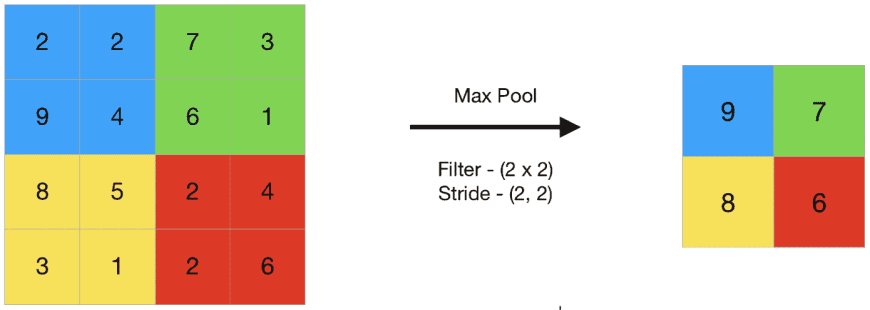
Pooling reduces spatial size to make computation faster and avoid overfitting.
The most common is:
Max Pooling
It takes the maximum value from each small region (e.g., 2 × 2).
Why?
Because the strongest activation usually represents the most important pattern.
Example:
If one part of the region strongly detects an edge, that’s more useful than the weaker background pixels.
Pooling helps CNNs:
-
stay fast
-
reduce memory cost
-
generalize better
-
focus on important features
7. Stacks of Convolution + Pooling
CNNs are “deep” networks because they stack multiple layers.
A typical flow might look like:
-
Conv → ReLU → Pool
-
Conv → ReLU → Pool
-
Conv → ReLU → Pool
Each layer extracts more meaningful information.
It’s similar to how your brain learns:
-
Early layers: “I see lines.”
-
Middle layers: “I see shapes.”
-
Later layers: “I see a dog.”
8. Feature Maps & Filters
In a Convolutional Neural Network, filters and feature maps work together to help the model understand what is happening inside an image. Even though the network starts with raw pixel values, these two components gradually transform the image into meaningful patterns the CNN can recognize.
Filters: The Pattern Detectors
A filter (also called a kernel) is a small matrix of numbers that slides across the image to look for a specific type of pattern.
Each filter learns one kind of visual cue—such as:
-
an edge
-
a curve
-
a texture
-
a corner
-
a color transition
-
a ridge or contour
Every filter acts like a tiny “specialist” focusing on detecting one visual characteristic.
Feature Maps: The Filter’s Output
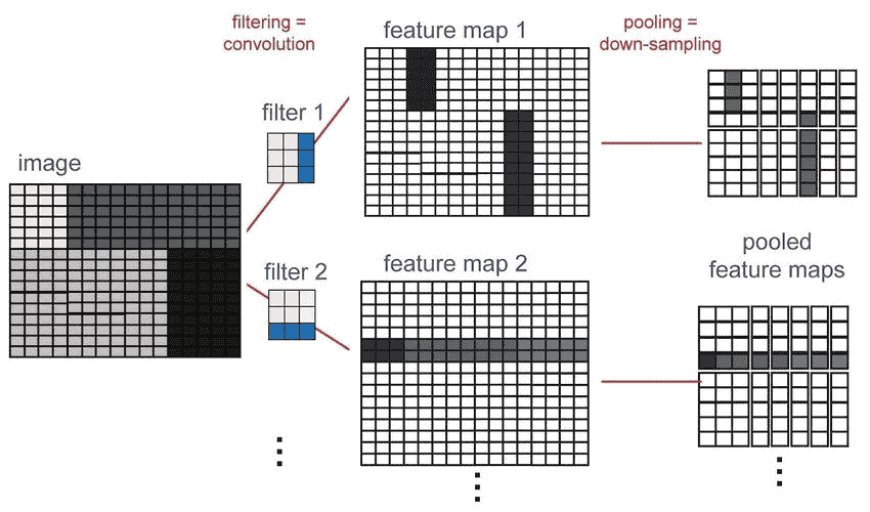
When a filter moves across the image, it performs convolution and produces a new output known as a feature map.
A feature map highlights where the filter’s learned pattern exists in the image:
-
If the filter detects horizontal edges, the feature map becomes bright wherever horizontal edges appear.
-
If the filter looks for curves, the map activates around curved shapes.
-
If the filter focuses on textures, it highlights textured areas.
In simple terms:
A filter finds a pattern → a feature map shows where that pattern appears.
Hundreds of Filters = Hundreds of Feature Maps
A CNN doesn’t rely on just one filter.
A single convolution layer may use:
-
32 filters
-
64 filters
-
128 filters
-
even 512+ filters in deeper layers
And for every filter, the network produces one feature map.
So if you have 64 filters, you get 64 feature maps.
If you have 256 filters, you get 256 feature maps.
This is why CNNs become so powerful: each filter captures a different piece of visual information.
How This Helps the CNN Understand Complex Structures
When all these feature maps are stacked together, they form a rich representation of the image:
-
Early layers detect simple patterns like lines and edges.
-
Middle layers combine these into curves, corners, and textures.
-
Deeper layers combine everything into object parts—like eyes, wheels, leaves, or shapes.
This layered understanding enables the network to recognize even complex visual structures.
9. Flattening Layer Turning Feature Maps Into a Vector
After an image passes through multiple convolution and pooling layers, the CNN has already learned a wealth of information. By this stage, the network has extracted edges, shapes, textures, and high-level features from the input image. But the output of these layers is still in a 3D format—a stack of many feature maps.
For example, after several operations, you might end up with something like:
7 × 7 × 128
-
7 × 7 → the spatial size (height and width of the final feature maps)
-
128 → the number of filters applied, meaning 128 different feature maps
Even though this 3D block contains rich information, it cannot be directly connected to a dense (fully connected) layer. Dense layers expect a 1D vector, not a 3D structure.
This is where the Flattening Layer comes in.
What Flattening Actually Does
Flattening is simply the process of unrolling or reshaping the final 3D feature maps into a single continuous vector.
So:
7 × 7 × 128 → 6272 values in one long vector
It doesn’t change the values themselves.
It just reorganizes the data into a shape that the next layer understands.
Why Flattening Is Important
A fully connected (dense) layer works like a traditional neural network:
-
It expects one long list of numbers as input.
-
Each number becomes a node.
-
These nodes connect to the neurons in the next layer.
If flattening was not done, the dense layer would have no way to interpret the 3D structure.
Flattening acts as a bridge:
-
The convolutional part of the network → extracts meaningful features
-
The dense part of the network → interprets those features and makes the final decision
Without flattening, the two sections simply wouldn’t connect.
What Flattening Represents in Terms of Learning
Flattening consolidates all learned features—edges, corners, textures, shapes, and parts of objects—into a unified form.
This vector becomes the complete feature representation of the input image.
In other words:
-
Convolution layers learn what is in the image
-
Pooling layers reduce and strengthen the most important features
-
Flattening gathers all those features
-
Dense layers use them to decide what the image actually is
Flattening is like taking all the notes from different chapters and merging them into one summary page before writing the final exam answer.
10. Fully Connected Layer Final Decision Stage
This part behaves like a standard neural network.
It:
-
takes flattened features
-
interprets them
-
assigns probability scores
-
outputs the final label
Example probability output:
|
Class |
Probability |
|
Cat |
0.02 |
|
Dog |
0.97 |
|
Rabbit |
0.01 |
Softmax is commonly used to normalize probabilities.
11. Full CNN Pipeline
Once the image has passed through all the convolution and pooling layers and is flattened into a long vector, it enters the fully connected layer. This part works just like a traditional neural network.
The fully connected layer:
-
Takes the flattened features learned from earlier layers
-
Interprets these features to understand what they represent
-
Generates probability scores for each possible class
-
Selects the final label based on the highest probability
For example:
|
Class |
Probability |
|
Cat |
0.02 |
|
Dog |
0.97 |
|
Rabbit |
0.01 |
The image would be classified as a dog.
A Softmax function is used here to convert numeric scores into clear probabilities that add up to 1.
12. Real-World Applications of CNNs
CNNs power modern vision systems:
Healthcare
-
Tumor detection
-
X-ray analysis
-
Skin disease classification
Autonomous Vehicles
-
Lane detection
-
Traffic sign recognition
-
Pedestrian tracking
Security
-
Face recognition
-
Threat detection
-
License plate reading
Retail & E-commerce
-
Visual search
-
Product tagging
-
Recommendation engines
Everyday Tech
-
Instagram filters
-
Face unlock
-
Google Photos categorization
CNNs are everywhere—even when you don’t notice.
13. Why CNNs Are So Effective
CNNs work extremely well because they:
-
Preserve spatial relationships
-
Automatically learn useful features
-
Reduce parameters through weight sharing
-
Handle variations in position, scale, orientation
-
Generalize better than traditional networks
Their architecture is inspired by the human visual cortex.
14. Limitations of CNNs
Even though CNNs are powerful, they’re not perfect:
-
Require large datasets
-
High computational cost
-
Hard to interpret
-
Vulnerable to adversarial noise
-
Struggle with long-range dependencies
But despite these challenges, CNNs remain the backbone of modern computer vision.
Summary
A Convolutional Neural Network is one of AI’s most important innovations.
It works by:
-
looking at images in small sections
-
detecting patterns
-
building understanding layer by layer
-
identifying objects with high accuracy
CNNs bring visual intelligence to machines.
Whether you're building AI systems, studying deep learning, or simply exploring how machines “see,” understanding CNNs is a foundational step in your AI journey.