



























































What Is a Data Pipeline?
Learn what a data pipeline is, how it moves data from source to destination, and why it's essential for data integration, analytics, and business insights.


Data only becomes useful when it’s in the right place. Reports, dashboards, alerts, and machine learning models all rely on data being moved from where it’s created to where it’s needed. That movement doesn’t happen randomly—it follows a clear, reliable process. That’s what a data pipeline does.
You’ll learn what a data pipeline is, how it works, how it fits into today’s data systems, and what to think about if you're planning to build one. If you want to make your data easier to use and more reliable, this guide is a good place to start.
What a Data Pipeline Really Means
A data pipeline is a structured series of steps that moves and transforms data from source systems to destination systems. It’s not just about transportation; it’s also about preparation—making data usable by shaping, cleaning, and enriching it along the way.
Whether you’re collecting sensor data from machines, syncing app logs to a central warehouse, or preparing customer attributes for a machine learning model, the goal is the same: get data from point A to point B in the right form, at the right time.
Core Layers in a Data Pipeline
To understand a pipeline, think of it as a layered process:
-
Input Sources: Where data originates—this could be databases, third-party tools, clickstreams, mobile apps, IoT devices, or logs.
-
Collection Mechanism: How data enters the system. This might be real-time streams, scheduled extractions, or event triggers.
-
Transformation Logic: This is where raw data becomes structured, standardized, or aggregated. It includes removing nulls, converting types, mapping codes, and more.
-
Target System: Where data ends up—often a data warehouse, data lake, or analytics engine.
-
Process Orchestration: Coordination of tasks and dependencies across pipeline stages. This includes triggering jobs, managing retries, and sequencing tasks.
-
Monitoring and Logging: Observability features that help track the health of the pipeline and catch errors or anomalies.
Different Pipeline Execution Models
There’s more than one way to run a pipeline. Each model supports different operational and analytical needs:
-
Scheduled or Batch Pipelines: Run at fixed intervals (hourly, nightly). Suitable for financial reporting, monthly summaries, and dashboard refreshes.
-
Streaming or Real-Time Pipelines: Respond to events as they occur. Useful for fraud detection, recommendation engines, and activity monitoring.
-
Hybrid Pipelines: Mix both approaches—real-time for current data, batch for completeness or historical correction.
Choosing the right model depends on the speed of insight required, the complexity of the transformations, and the tools available.
Why Teams Build Pipelines
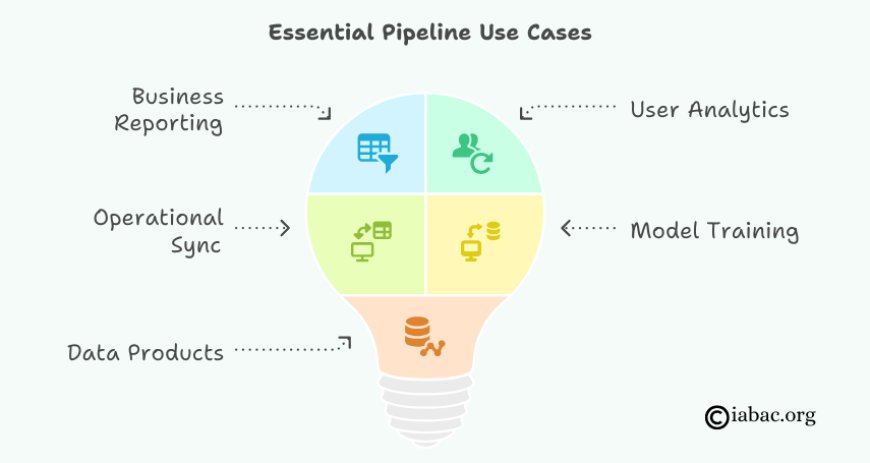
Some common use cases where pipelines become essential:
-
Business Reporting: Moving CRM and sales data into analytics platforms.
-
User Analytics: Consolidating web, mobile, and app behavior into a central system.
-
Operational Sync: Keeping different databases aligned for consistent user experiences.
-
Model Training: Delivering clean, labeled data to machine learning systems.
-
Data Products: Powering APIs, dashboards, or customer-facing tools with fresh data.
These aren’t isolated tasks—they form the backbone of data operations across teams.
A Look at the Pipeline Tech Stack
Building and maintaining a pipeline involves a number of components. Common tools include:
-
Ingestion: Apache Kafka, Fivetran, AWS Kinesis, Apache NiFi
-
Processing & Transformation: Apache Spark, dbt, Apache Flink, Pandas (for lightweight jobs)
-
Storage: Google BigQuery, Snowflake, Amazon Redshift, Delta Lake
-
Orchestration: Apache Airflow, Prefect, Dagster
-
Observability: Monte Carlo, Datafold, OpenLineage, custom dashboards
Choosing tools depends on team skillsets, budget, scalability needs, and data complexity. Many teams start with managed services and gradually take ownership as scale increases.
What Can Go Wrong — And What to Watch For
Pipelines aren’t just built and forgotten. They evolve, and they break. Common failure points include:
-
Schema Drift: Data structures change upstream and break transformations.
-
Silent Data Loss: Jobs appear to succeed but skip key records.
-
Version Conflicts: Library or format mismatches cause parsing failures.
-
Inefficiency: Poorly designed transformations consume too much compute.
-
Lack of Alerts: Failures go unnoticed, leading to outdated dashboards or reports.
Prevention starts with good design: validation, testing, observability, and clear ownership.
Building Pipelines as Internal Products
The most resilient pipelines aren’t treated as one-off workflows. They’re handled like internal products:
-
Version Controlled: Code and logic changes are tracked and tested.
-
Well Documented: New engineers can understand purpose and design.
-
Observable: Metrics, logs, and alerts support fast debugging.
-
Modular: Components can be swapped out or extended.
-
Aligned with Stakeholders: Built around actual data consumers and business needs.
Treating pipelines as internal infrastructure, not side projects, leads to more reliable systems and fewer last-minute fixes.
Emerging Practices Reshaping Pipeline Design
Data teams are adopting new patterns to make pipelines more flexible, scalable, and trustworthy:
-
Declarative Frameworks: SQL-first tools like dbt bring structure, lineage, and testing to transformations.
-
Streaming-First Architectures: Systems like Apache Kafka and Apache Flink are enabling real-time applications beyond basic logging.
-
Data Contracts: Explicit agreements between producers and consumers help maintain schema stability.
-
Observability by Default: Data quality checks, freshness indicators, and lineage tracking are becoming standard.
-
Composable Pipelines: Reusable components across multiple workflows reduce duplication.
These trends don’t just reduce risk—they make it easier to scale and collaborate across teams.
Think in Systems
Understanding a data pipeline goes beyond knowing its components. It’s about recognizing how they connect: where data enters, how it changes, where it goes, and who depends on it.
Good pipelines reduce manual work, improve data trust, and accelerate how fast teams can answer questions. But they also require iteration. No pipeline is perfect on day one. What matters is that it’s designed with clear purpose, monitored closely, and built to adapt.
Start with a use case. Map your data flow. Choose tools that support reliability and growth. And treat the pipeline as a long-term asset—not just a means to an end.