




















































SQL For Beginners with no Programming experience
SQL from scratch with this beginner-friendly guide. Understand databases, write queries, filter data, and build essential skills for data careers.


SQL feels intimidating when you have never written a line of code in your life. I get it. Most people assume it is only for programmers. It is not.
By the end of this guide, you will understand what SQL is, how it works, and how to write your first real queries. No prior programming knowledge needed. No fancy setup. Just a clear path from zero to your first working SQL commands.
What Is SQL and Why Does It Matter?
SQL stands for Structured Query Language. It is the standard language used to communicate with relational databases and the organised tables where most of the world's business data lives.
Think of a database as a giant Excel spreadsheet with millions of rows. SQL is the tool you use to ask those spreadsheet questions. "Show me all customers who bought something in the last 30 days." "What was our revenue this month?" SQL answers those questions in seconds.
Here is why this skill matters right now: according to the US Bureau of Labor Statistics, job openings for data professionals are projected to grow by 34 percent between 2024 and 2034 far above the three percent average for all occupations. SQL is listed as a required skill in the vast majority of those roles. That means if you learn SQL, you are not studying something obscure. You are learning the foundation of one of the fastest-growing career fields in the world.
I have worked with data for years. SQL was the first technical skill I picked up, and it remains the most-used skill in my daily work. Python, machine learning, dashboards all of that comes later.
Step 1: Understand how a Relational Database Is Organised
A relational database stores data in tables. Each table has rows (individual records) and columns (attributes of those records). Think of an "Employees" table: each row is one employee, and the columns hold their name, department, salary, and hire date.
Tables are connected to each other using keys. A primary key uniquely identifies each row in a table.
Example: An "Orders" table might have a column called customer_id. That customer_id is a foreign key that links back to a "Customers" table where that customer's full details live.
Once you understand this structure, everything in SQL starts to make sense. You are not writing code, you are asking questions about connected tables.
Step 2: Write Your First SQL Query with Select
The SELECT statement is where everyone starts. It retrieves data from a table.
Here is the basic structure:
SELECT column1, column2 FROM table_name;
Real example: if you want to see the names and salaries of all employees, you write:
SELECT name, salary FROM employees;
If you want to see every column in the table, use an asterisk:
SELECT * FROM employees;
What you should see: A grid of data appears. All rows from the table, with the columns you asked for. If you see an error, check your spelling table and column names are case-sensitive in some database systems.
Common mistake here: beginners forget the semicolon at the end of the query. In most systems, the semicolon tells SQL that your statement is finished. Always include it.
Step 3: Filter Your Results Using the where Clause
A SELECT query with no filter gives you everything in the table. Most of the time, you do not need everything. You need something specific.
That is where the WHERE clause comes in.
SELECT name, salary FROM employees WHERE department = 'Marketing';
This returns only employees in the Marketing department. You can combine conditions using AND and OR:
SELECT name, salary FROM employees WHERE department = 'Marketing' AND salary > 50000;
What you should see: A smaller, filtered result set. Only the rows that match your conditions appear.
A note on text versus numbers: when filtering on text values (like department names), wrap them in single quotes. When filtering on numbers (like salary), do not use quotes. This trips up almost every beginner.
Step 4: Summarise Data with Aggregate Functions
This is where SQL starts to feel genuinely powerful. Instead of looking at individual rows, you can calculate summaries across your data.
The most common aggregate functions are:
-
COUNT() — counts the number of rows
-
SUM() — adds up all values in a column
-
AVG() — calculates the average
-
MIN() and MAX() — finds the lowest and highest values
Example: How many employees are in the Marketing department?
SELECT COUNT(*) FROM employees WHERE department = 'Marketing';
Example: What is the average salary across the whole company?
SELECT AVG(salary) FROM employees;
What you should see: A single number returned. Not a list of rows — just the calculated result.
Step 5: Group and Sort with Group by and Order by
Once you know how to summarise data, the next natural step is to summarise it by category.
GROUP BY lets you do exactly that:
SELECT department, AVG(salary) FROM employees GROUP BY department;
This gives you the average salary for each department — one row per department, not one row per employee.
ORDER BY sorts your results:
SELECT department, AVG(salary) FROM employees GROUP BY department ORDER BY AVG(salary) DESC;
DESC sorts from highest to lowest. ASC sorts from lowest to highest.
What you should see: A clean table showing each department alongside its average salary, sorted from the highest-paying department to the lowest.
Step 6: Connect Tables Using Join
This is the step most beginners find intimidating. It is not as hard as it looks.
A JOIN lets you combine data from two tables based on a shared column. If you have an Employees table and a Departments table, and both have a department_id column, you can join them:
SELECT employees.name, departments.department_name FROM employees JOIN departments ON employees.department_id = departments.department_id;
The most common type is the INNER JOIN (often just written as JOIN). It returns only the rows where a match exists in both tables.
What you should see: A result combining columns from both tables. Each employee's name appears alongside the full name of their department.
If you see fewer rows than you expected, check whether all your records have matching values in both tables. A missing match means that row gets excluded from an Inner Join.
Step 7: Modify Data with Insert, Update, and Delete
Up to this point, you have only been reading data. SQL also lets you write to a database.
INSERT adds a new row:
INSERT INTO employees (name, department, salary) VALUES ('Rohit Sharma', 'Finance', 62000);
UPDATE changes existing data:
UPDATE employees SET salary = 68000 WHERE name = 'Rohit Sharma';
DELETE removes rows:
DELETE FROM employees WHERE name = 'Rohit Sharma';
Critical warning: Always use a WHERE clause with UPDATE and DELETE. Without it, you will modify or delete every single row in the table. This is the single most costly beginner mistake I have seen in real working environments.
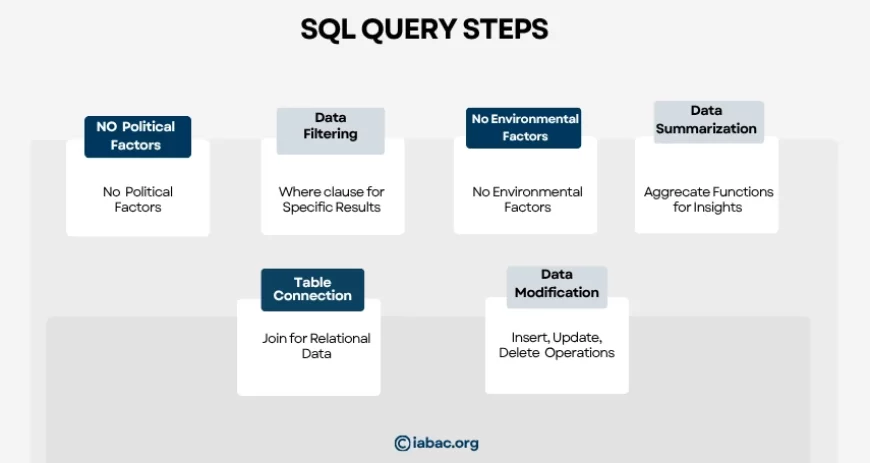
Quick Reference: All Steps at a Glance
Step 1: Database Structure: Understand tables, rows, columns, and keys. Action: Explore the schema before writing anything.
Step 2: SELECT: Retrieve data from a table. Example: SELECT name FROM employees;
Step 3: where: Filter rows by condition. Example: WHERE salary > 50000
Step 4: Aggregate Functions: Summarise data. Example: SELECT AVG(salary) FROM employees;
Step 5: Group by / Order by: Group by category, sort results. Example: GROUP BY department ORDER BY salary DESC
Step 6: Join: Combine data from two tables. Example: JOIN departments ON employees.dept_id = departments.dept_id
Step 7: Insert, Update, Delete: Add, change, or remove data. Always pair Update and Delete with a where clause.
Where to Practice SQL for Free?
Reading about SQL is one thing. Writing queries is what actually builds the skill. Here are reliable free environments where you can practise:
-
DB Fiddle (dbfiddle.uk): run SQL in your browser, no installation needed
-
SQLZoo: structured exercises with instant feedback
-
Mode Analytics SQL Tutorial: real datasets, real-world scenarios
-
MySQL Workbench: free desktop tool for MySQL databases
-
pgAdmin: free tool for PostgreSQL
I recommend starting with DB Fiddle. You can paste any query from this guide and see it run immediately. That instant feedback loop is how you learn fastest.
What SQL Opens Up for Your Career
SQL is not a niche skill. According to LinkedIn Learning, SQL consistently ranks among the top technical skills requested by employers across data-related roles. It appears in job postings for data analysts, business analysts, product managers, marketing analysts, and operations roles alike.
From what I observe in the industry, SQL tends to be the entry point that makes other roles accessible. A marketing professional who understands SQL does not need to wait for a data team to pull reports. A finance analyst who can query a database directly becomes significantly more productive.
For those considering a career move: the World Economic Forum's Future of Jobs Report 2025 identifies data analysis and data management as skills that will see the highest demand increase over the next five years. SQL is the foundation of both.
SQL alone will not get you a data analyst job. But SQL is almost always the first checkpoint. If you cannot pass an SQL screening, the rest of the interview rarely happens.
If you have worked through this guide, you now understand the core building blocks of SQL. You know how databases are structured, how to retrieve and filter data, how to aggregate and sort results, how to join tables, and how to safely modify data.
The next step is to formalise that knowledge. At IABAC, we offer structured SQL certification programmes designed specifically for professionals who are entering data roles. A certification does two things: it gives you a structured curriculum so you do not miss important concepts, and it gives employers evidence that you know what you are doing.
Explore IABAC's SQL and Business Analytics certification programmes at iabac.org and take your first step toward a career built on real data skills.