


















































Top 10 Generative AI Tools Every Professional Should Know
Discover the top generative AI tools for professionals in 2026. Learn how to use AI tools for work, improve productivity, and scale output effectively.

Are you actually saving time with AI tools or just switching between them faster?
That’s a common challenge today. Generative AI tools are everywhere, but using them effectively in real work scenarios is where most professionals get stuck. Some are already streamlining workflows, scaling content creation, and improving productivity. Others remain in constant experimentation without clear outcomes.
The shift is no longer about access, it’s about application. Understanding where these tools fit, and how they actually work, is what turns usage into real value.
What Are Generative AI Tools?
Generative AI tools are advanced software systems designed to create new content such as text, images, code, audio, and video by learning patterns from large datasets. Instead of simply retrieving or processing existing information, these tools generate original outputs based on context, intent, and user input.
Unlike traditional automation tools that operate on fixed rules and predefined workflows, generative AI systems are adaptive. They can interpret complex instructions, respond dynamically, and produce contextually relevant results, making them suitable for a wide range of professional tasks.
Their core capabilities typically include:
-
Text generation for reports, emails, documentation, and content creation
-
Image generation for design, branding, and marketing assets
-
Code generation for software development and automation
-
Audio and video creation for communication, training, and media production
As a result, professionals across industries are adopting generative AI and relevant tools not just to automate repetitive tasks, but to enhance productivity, accelerate output, and expand creative possibilities, areas where traditional tools have clear limitations.
How to Choose the Right Generative AI Tool

Not every AI tool fits every workflow. The right choice depends on how well it integrates into your daily work.
-
Use case alignment: Choose tools based on what you actually do - writing, coding, design, or communication.
-
Ease of use vs customization: Some tools prioritize simplicity, while others offer advanced control. Professionals often need a balance.
-
Workflow integration: Tools that connect with platforms like Slack, Google Workspace, or CRM systems deliver higher productivity.
-
Pricing and scalability: Evaluate long-term value, especially if the tool will be used across teams.
According to McKinsey’s State of AI report, 88% of organizations now use AI in at least one business function, up from 78% in previous years, yet most are still operating in early-stage experimentation. This is where the gap is widening—between professionals who apply AI tools strategically and those who do not.
Quick Overview of Top Generative AI Tools for Professionals
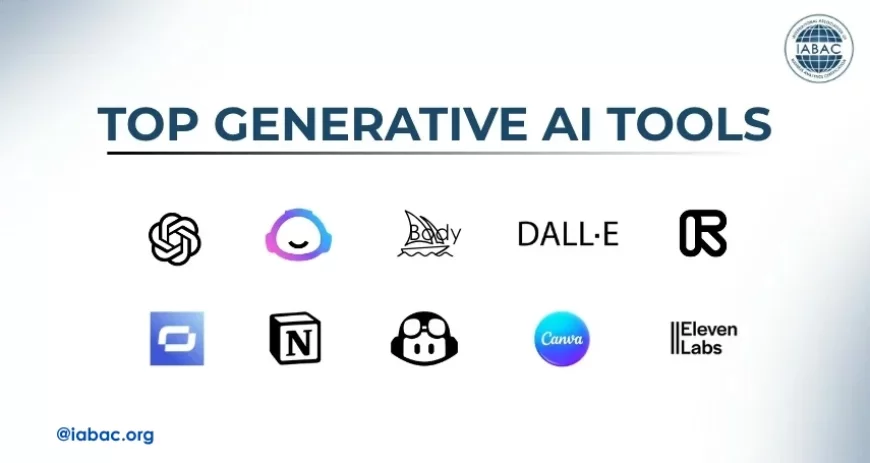
To understand how these tools apply in practice, here’s a quick overview of widely used generative AI tools across different functions.
|
Tool Name |
Category |
Primary Strength |
Best For |
|
ChatGPT |
Text & Conversational AI |
Context-aware content generation and task assistance |
Writing, research, workflows |
|
Jasper AI |
Marketing & Content AI |
Brand-consistent content generation |
Marketing teams, copywriting |
|
Midjourney |
Image Generation |
High-quality, artistic visuals |
Designers, creatives |
|
DALL·E |
Image Generation |
Prompt-based visual creation |
Marketing, content teams |
|
Runway ML |
Video Generation |
AI-powered video creation and editing |
Content creators, marketers |
|
Synthesia |
AI Video & Avatars |
Script-to-video with AI avatars |
Corporate training, communication |
|
Notion AI |
Productivity & Documentation |
AI-assisted note-taking and documentation |
Teams, knowledge management |
|
GitHub Copilot |
Coding AI |
Real-time code suggestions |
Developers, engineers |
|
Canva AI |
Design & Content AI |
AI-powered visual design tools |
Non-designers, marketers |
|
ElevenLabs |
Audio Generation |
Realistic AI voice synthesis |
Voiceovers, content production |
1. ChatGPT (Content, Research, Automation)
ChatGPT is a large language model-based generative AI tool developed to understand and produce human-like text across a wide range of professional contexts. It uses deep learning techniques trained on extensive datasets to generate responses, analyze information, and assist with decision-making tasks.
Unlike traditional chatbots, it can handle complex queries, multi-step reasoning, and contextual conversations. This makes it a reliable tool for knowledge work, content creation, and workflow automation.
Best for: Writing, ideation, summaries, workflows
Key features:
-
Context-aware responses
-
Document summarization
-
Workflow automation via prompts
Practical use case: Drafting reports, creating content briefs, automating repetitive communication.
Real-World Example: A marketing manager uses it to generate campaign ideas, draft emails, and analyze customer feedback.
Pros:
-
Highly versatile
-
Easy to use
-
Strong reasoning capabilities
Cons:
-
Requires prompt clarity
-
Needs validation for accuracy
2. Jasper AI (Marketing & Copywriting)
Jasper AI is a generative AI writing platform specifically designed to support marketing and content teams in producing high-quality, brand-consistent communication. It leverages natural language processing to generate long-form and short-form content aligned with business goals.
The platform includes pre-trained templates and brand voice customization features to maintain consistency across campaigns. It is widely used to scale content production without compromising messaging quality.
Best for: Ad copy, blogs, brand voice
Key features:
-
Pre-built marketing templates
-
Brand voice customization
-
SEO-focused outputs
Practical use case: Content teams use it to scale blog production while maintaining consistent tone.
Real-World Example: A marketing team uses Jasper AI to generate SEO-optimized blogs, ad copy, and email campaigns while maintaining consistent brand voice.
Pros:
-
Marketing-focused
-
Time-saving templates
Cons:
-
Limited outside marketing use cases
-
Subscription cost
3. Midjourney (AI Image Generation)
Midjourney is a generative AI tool that transforms text prompts into highly detailed and visually refined images. It uses advanced diffusion models to interpret descriptive inputs and generate artistic outputs with strong stylistic control. The platform is particularly known for producing high-quality, concept-driven visuals that resemble professional design work. It is widely used in creative industries for ideation, branding, and visual storytelling.
Best for: High-quality visuals and creative assets
Key features:
-
Artistic image generation
-
Style customization
-
High-resolution outputs
Practical use case: Creating campaign visuals, concept art, branding assets
Real-World Example: Design teams use it to create concept visuals before final production.
Pros:
-
Exceptional image quality
-
Strong creative control
Cons:
-
Learning curve
-
Limited integrations
4. DALL·E (Image Creation from Text)
DALL·E is a generative AI model developed to create images directly from natural language descriptions. It combines computer vision and language understanding to generate visuals that match user prompts with contextual accuracy. The tool also supports image editing and variation generation, enabling users to refine outputs iteratively. It is particularly effective for rapid visual prototyping and marketing asset creation.
Best for: Concept visuals, marketing creatives
Key features:
-
Text-to-image generation
-
Image editing and variations
-
Fast output generation
Practical use case: Rapid prototyping of creative ideas for campaigns
Real-World Example: Marketers generate quick visuals for campaigns without relying on design teams.
Pros:
-
Easy to use
-
Quick turnaround
Cons:
-
Less stylistic depth than advanced tools
5. Runway ML (AI Video Editing & Generation)
Runway ML is a generative AI platform focused on video creation, editing, and enhancement using machine learning models. It enables users to generate video content from text prompts, apply visual effects, and automate complex editing tasks without traditional software expertise. The platform integrates multiple AI models to support motion tracking, background removal, and scene generation. It is widely used by content creators and media teams to accelerate production workflows.
Best for: Video creators, marketers
Key features:
-
Text-to-video tools
-
Background removal
-
Motion tracking
Practical use case: Creating short-form marketing videos and visual storytelling
Real-World Example: Marketing teams create short-form video content for campaigns with minimal editing effort.
Pros:
-
Reduces production time
-
Powerful editing capabilities
Cons:
-
Output quality varies
-
Requires experimentation
6. Synthesia (AI Video Avatars)
Synthesia is a generative AI platform that creates professional videos using AI-generated human avatars and synthetic voiceovers. It allows users to convert text scripts into fully produced videos without cameras, actors, or studios. The platform supports multiple languages and enables consistent, scalable video production for enterprise communication. It is commonly used for training, onboarding, and corporate messaging.
Best for: Training videos, corporate communication
Key features:
-
AI avatars
-
Multilingual support
-
Script-to-video automation
Practical use case: Employee training videos without filming.
Real-World Example: HR teams develop onboarding videos for global employees.
Pros:
-
Scalable production
-
Professional output
Cons:
-
Limited emotional expression
-
Subscription cost
7. Notion AI (Productivity & Documentation)
Notion AI is an integrated generative AI feature within the Notion workspace that enhances productivity through intelligent content generation and organization. It assists users in drafting documents, summarizing information, and structuring workflows directly within their existing workspace. By combining knowledge management with AI capabilities, it reduces manual effort in documentation and collaboration. It is especially useful for teams managing large volumes of internal content.
Best for: Internal docs, notes, workflows
Key features:
-
Smart summaries
-
Task generation
-
Content drafting
Practical use case: Managing internal documentation and team collaboration
Real-World Example: Teams automate meeting notes and maintain structured documentation.
Pros:
-
Seamless integration
-
Improves efficiency
Cons:
-
Limited outside Notion ecosystem
8. GitHub Copilot (AI Coding Assistant)
GitHub Copilot is a generative AI coding assistant that provides real-time code suggestions within development environments. It is trained on large code repositories to understand programming patterns and generate relevant code snippets. The tool helps developers write code faster, reduce repetitive tasks, and improve productivity. It integrates directly with popular IDEs, making it a practical addition to modern software development workflows.
Best for: Developers, automation of code writing
Key features:
-
Code auto-completion
-
Multi-language support
-
IDE integration
Practical use case: Accelerating software development and reducing repetitive coding tasks
Real-World Example: Developers accelerate feature development and debugging processes.
Pros:
-
Speeds up coding
-
Reduces manual effort
Cons:
-
Requires review for accuracy
-
May suggest suboptimal code
9. Canva AI (Design Made Easy)
Canva AI is an extension of the Canva design platform that incorporates generative AI features to simplify visual content creation. It enables users to generate designs, images, and layouts using text prompts and automated suggestions. The platform is designed for accessibility, allowing non-designers to produce professional-quality visuals quickly. It is widely used for business presentations, social media content, and marketing materials.
Best for: Non-designers creating professional graphics
Key features:
-
Magic design tools
-
Templates and automation
-
Text-to-image capabilities
Practical use case: Creating presentations, social media graphics, marketing assets
Real-World Example: Business professionals create branded presentations and visuals.
Pros:
-
User-friendly
-
Fast output
Cons:
-
Limited advanced customization
10. ElevenLabs (AI Voice Generation)
ElevenLabs is a generative AI platform that specializes in creating highly realistic synthetic voice outputs. It uses advanced speech synthesis models to generate natural-sounding audio from text inputs. The platform also supports voice cloning and multilingual voice generation, enabling scalable audio content production. It is widely used in media, education, and content creation for voiceovers and narration.
Best for: Voiceovers, podcasts, content production
Key features:
-
Natural voice synthesis
-
Voice cloning
-
Multilingual support
Practical use case: Podcast narration, video voiceovers, customer communication
Real-World Example: Content creators produce narration for videos and podcasts without recording equipment.
Pros:
-
High-quality audio
-
Realistic output
Cons:
-
Ethical concerns
-
Requires responsible usage
Benefits of Using Generative AI Tools

Generative AI tools are reshaping how work is executed by improving both speed and output quality across functions.
-
Time savings: Tasks that once took hours can now be completed in minutes.
-
Cost efficiency: Reduced dependency on large teams for content and design.
-
Scalability: Ability to produce content at scale without compromising speed.
-
Enhanced creativity: Faster experimentation with ideas and formats.
-
Improved productivity: Automates repetitive tasks, allowing focus on strategic work.
-
Consistency in output: Maintains uniform tone, style, and quality across deliverables.
-
Faster decision-making: Provides quick insights, summaries, and data interpretation.
-
Accessibility: Enables non-experts to perform complex tasks with ease.
PwC’s Global AI Jobs Barometer shows that skills for AI-exposed roles are evolving 66% faster than other jobs, while professionals with AI expertise now command a 56% wage premium - more than double the 25% seen in previous years.
Limitations and Things to Watch Out For
Despite their benefits, generative AI tools come with limitations that professionals must carefully manage.
-
Accuracy risks: AI-generated outputs may contain factual errors or incomplete information and require validation.
-
Data privacy concerns: Sensitive or proprietary data should not be shared without proper security controls.
-
Over-reliance on AI: Excessive dependence can reduce critical thinking and human oversight.
-
Bias and compliance risks: Outputs may reflect biases in training data and may not always meet regulatory or ethical standards.
-
Lack of contextual judgment: AI may miss business context, nuance, or intent in complex scenarios.
-
Intellectual property risks: Generated content may raise ownership or copyright concerns in certain use cases.
The World Economic Forum notes that generative AI is evolving faster than current governance systems can adapt, creating challenges around regulation, accountability, and responsible deployment.
Understanding both the capabilities and limitations of these tools is essential, but applying them effectively requires the right approach and experience.
Build Real-World Generative AI Expertise
Understanding generative AI tools is only the starting point, what truly sets professionals apart is the ability to apply them in real work environments.
Today, organizations are looking for individuals who can use AI tools to streamline workflows, solve business problems, and deliver measurable outcomes, not just experiment with them.
The IABAC Generative AI Specialist program is built around this exact need. It gives you hands-on exposure to leading generative AI tools, practical use cases across functions, and the opportunity to work on real-world projects that reflect how AI is used in the industry today.
Start your Generative AI journey today with IABAC!
Generative AI tools are quickly becoming a standard part of professional workflows - not an added advantage. Early adopters are already seeing the impact.
However, value does not come from adoption alone. It comes from clarity- choosing the right tools, applying them effectively, and continuously refining their use.
Professionals who take a structured approach today will be better equipped to meet the speed, scale, and expectations of tomorrow’s work environment.