



























































Prompt Engineering Guide: How to Write Better AI Prompts (With Examples)
Learn prompt engineering with simple techniques, real examples, and AI prompting tips to get better results from ChatGPT, Claude, and other AI tools.

You typed something into an AI tool. You got back a response that was technically fine but completely unusable — too vague, too long, or just weirdly off-point. You tried again. Same result. Eventually, you gave up and assumed AI just wasn't as powerful as the hype suggested.
The AI wasn't the problem. Your prompt was.
This is the experience of most people who use tools like ChatGPT or Claude for the first time. They treat AI like a smarter search engine — toss in a question and hope for the best. But that's not how large language models work. They respond to clarity. The more structured your input, the more useful your output. That gap between what you ask and what you get? That's the problem prompt engineering solves.
And no, you don't need to be a developer to learn it.
What Is Prompt Engineering?
Prompt engineering is the practice of writing inputs — your messages to an Artificial Intelligence — in a way that reliably produces high-quality, relevant outputs.
Think of it like briefing a new hire. If you said "write something about the product," you'd get something unusable. But if you said "write a 100-word product description for a project management tool targeting small business owners, in a friendly but professional tone," you'd get something worth using. The same logic applies to AI.
Good prompt engineering helps you save time by cutting back-and-forths, get more accurate results that match your actual intent, and unlock the deeper capabilities of AI tools most people never reach. Marketers, writers, students, developers, solopreneurs — anyone using AI regularly can benefit from getting better at this.
The Four Elements of a Strong Prompt
Before going into techniques, let's look at what every effective prompt is built from. There are four core components: Role, Task, Context, and Format.
Role sets the AI's persona or area of expertise — for example, "Act as a senior copywriter" or "You are a UX researcher." This shapes the lens through which the AI responds.
Task defines exactly what you want done. Be specific: "Write a product description" is better than "write something about this."
Context provides background — who the audience is, what the goals are, any constraints the AI should know about. This is what separates a generic response from a targeted one.
Format tells the AI how to structure its output. A table, a bullet list, a paragraph, a script — if you don't specify, the AI guesses. And it often guesses wrong.
You don't always need all four, but the more you include, the better your results. Compare these:
Weak prompt: "Write a bio for me."
Strong prompt: "Act as a professional copywriter. Write a third-person bio for a UX designer with 8 years of experience in fintech. Keep it under 120 words, confident but not arrogant, suitable for a LinkedIn profile."
The difference isn't length. It's clarity and direction.
Core Prompt Engineering Techniques (With Examples)
Zero-Shot Prompting
Zero-shot prompting means giving the AI a clear instruction without any examples. It works well for straightforward tasks where tone and style are less critical.
Example: "Explain compound interest to a 10-year-old in under 100 words."
The constraint — "to a 10-year-old," "under 100 words" — does the heavy lifting here. Simple. Direct. Effective.
Few-Shot Prompting
Few-shot prompting is where you provide 2–3 examples before the actual task. This is powerful when tone, style, or format needs to match something specific, because you're showing the AI exactly what "good" looks like rather than just describing it.
Example — Email subject lines:
"Write 5 email subject lines in the same style as these: 'Your Q3 report is ready (and it's actually readable)' 'We fixed the thing you've been complaining about' Now write 5 more for a productivity app launch."
This technique is especially useful for repetitive writing tasks. Build a small example bank for your brand voice, and reuse it every time.
Role Prompting
Assigning a role dramatically changes the quality and perspective of AI output. Instead of a generic answer, you get one filtered through a specific domain of expertise.
Example: "You are a senior UX designer with 10 years of experience in e-commerce. Review the following landing page copy and give me 5 specific improvements to increase conversion. Be direct and critical."
Role prompting is particularly valuable when you need expert-level thinking on a topic but don't have immediate access to an expert. The AI leans into the persona and adjusts its reasoning accordingly.
Chain-of-Thought Prompting
For complex tasks — analysis, decisions, logic problems — ask the AI to think through the problem step by step before delivering an answer. This produces more structured reasoning and reduces shallow or incorrect responses.
Example: "Walk me through this step by step before giving a final recommendation: I'm a solo creator with 2,000 email subscribers. Should I launch a newsletter or a podcast first? Consider audience size, content repurposing potential, and time commitment."
Adding "step by step" or "think through this before answering" consistently produces more well-reasoned, accurate outputs — especially for anything analytical or decision-based.
Constraint-Based Prompting
Adding specific constraints — word counts, excluded terms, reading levels, format rules — forces precision and prevents the AI from rambling or defaulting to generic language.
Example: "Explain blockchain to a small business owner in under 100 words. Do not use the words 'ledger,' 'decentralized,' or 'cryptocurrency.' Make it sound useful, not technical."
Constraints aren't limitations. They're guardrails that produce tighter, more useful outputs.
Prompt Examples Across Common Use Cases
Content Writing and Marketing
Blog intro: "Act as a content strategist writing for a SaaS audience. Write a 100-word intro for a post titled 'Why Most Project Management Tools Fail Small Teams.' Open with a bold claim, then tease the solution."
Instagram caption: "Write 3 caption options for a post about a new product feature. Brand voice: friendly, slightly witty, never corporate. Include one hashtag per caption. Keep each under 80 words."
Research and Summarization
Article summary: "Summarize the following article in exactly 5 bullet points. Focus on actionable insights only. Each bullet should start with a verb. [Paste article here]"
Comparison analysis: "Compare Notion and Obsidian for a freelance writer who works offline often. Use a table with columns: Feature, Notion, Obsidian, Best For. Add a one-paragraph recommendation."
Coding and Technical Tasks
Code generation: "Write a Python function that takes a list of email addresses and returns only the ones with valid formatting. Add inline comments. Use only standard libraries."
Debugging: "Here's a JavaScript function that should filter duplicate values from an array but isn't working. Identify the bug, fix it, and explain what was wrong in plain English — assume I'm a beginner. [Paste code here]"
Business and Productivity
Meeting agenda: "Create a 45-minute meeting agenda for a product team of 6. Goal: align on Q3 priorities. Include time allocations, a blockers section, and a clear action items format."
Weekly report: "Turn these rough bullet points into a polished weekly update for my manager. Under 200 words. Tone: professional but not stiff. Leads with wins, then blockers, then next week's focus. [Paste bullets here]"
Learning and Education
Feynman-style explanation: "Teach me how neural networks work using the Feynman technique. Start with the simplest possible analogy, then gradually build in complexity. Assume zero technical background."
Learning plan: "Create a 7-day SEO basics plan for someone with 30 minutes per day. For each day: topic, one free resource, and one practical exercise to reinforce it."
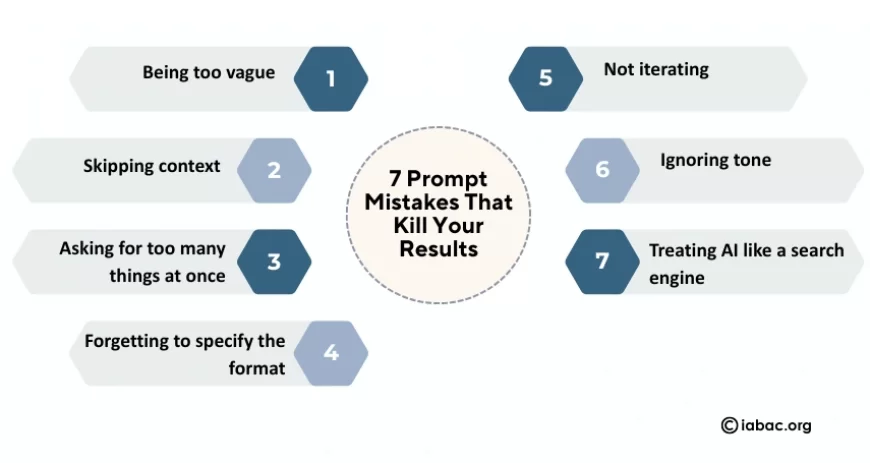
7 Prompt Mistakes That Kill Your Results
1. Being too vague. "Write something good" tells the AI nothing. Every word in your prompt is a signal. Vague input equals generic output.
2. Skipping context. The AI doesn't know your audience, your brand voice, or your goals unless you say so. Context is what separates useful from technically-correct-but-useless.
3. Asking for too many things at once. Stacking five requests in one prompt almost always produces mediocre results across all of them. Break it into steps.
4. Forgetting to specify the format. Do you want a list, a table, a paragraph, or a script? If you don't say, the AI guesses — and it often guesses wrong.
5. Not iterating. The first output is a draft, not a final answer. Treat the conversation as a loop — review what's off, refine one specific thing, and run it again.
6. Ignoring tone. "Professional" means something different to a law firm and a DTC skincare brand. Be specific: "concise and no-nonsense," "warm like a knowledgeable friend," "confident but not jargon-heavy."
7. Treating AI like a search engine. AI tools aren't for finding facts — they're for generating, analyzing, and thinking. Using them like Google leads to disappointment every time.
The Prompt Improvement Loop
Here's a three-step framework that improves almost any prompt:
Draft → Test → Refine
Start with the four elements: Role + Task + Context + Format. Run the prompt. Read the output critically — what's off? Too long? Wrong tone? Too generic? Then fix one specific thing and run it again. Don't rewrite everything; just close the gap.
Here's how that plays out in practice:
Draft: "Write a LinkedIn post about productivity."
Result: Generic tips about time blocking. Forgettable.
Refined: "Act as a founder sharing a personal lesson. Write a 150-word LinkedIn post about why to-do lists were killing your productivity and what you switched to. First-person. End with a question to drive comments."
Result: Specific, personal, ready to publish.
The AI won't get frustrated by your revisions. Use that to your advantage.
Why Prompt Engineering Skills Are Becoming Essential
AI literacy is no longer optional. As generative AI tools become embedded in workflows across industries — marketing, software development, education, healthcare, legal — the ability to communicate effectively with these systems is becoming a core professional skill.
Understanding natural language processing basics, how transformer-based models interpret instructions, and how to structure prompts for different AI use cases gives you a serious edge. It's the difference between an AI tool that saves you two hours a week and one that saves you two hours a day.
If you want to formalize these skills with a recognized credential, the IABAC AI Certification is worth exploring. It covers AI fundamentals, prompt engineering concepts, and practical AI application across business contexts — designed for professionals who want to work confidently with AI, not just around it.
Prompt engineering is a communication skill, not a technical one. The people who get the most out of AI tools aren't necessarily the most technical — they're the clearest thinkers. They know what they want, they know how to describe it, and they know how to iterate when the first draft misses the mark.
Start with the formula: Role, Task, Context, Format. Apply it to your next AI task and notice the difference immediately. Then experiment — use few-shot prompting when style matters, chain-of-thought when logic is involved, and constraints when precision counts.
The best AI prompt isn't the most complex one. It's the clearest one.