




























































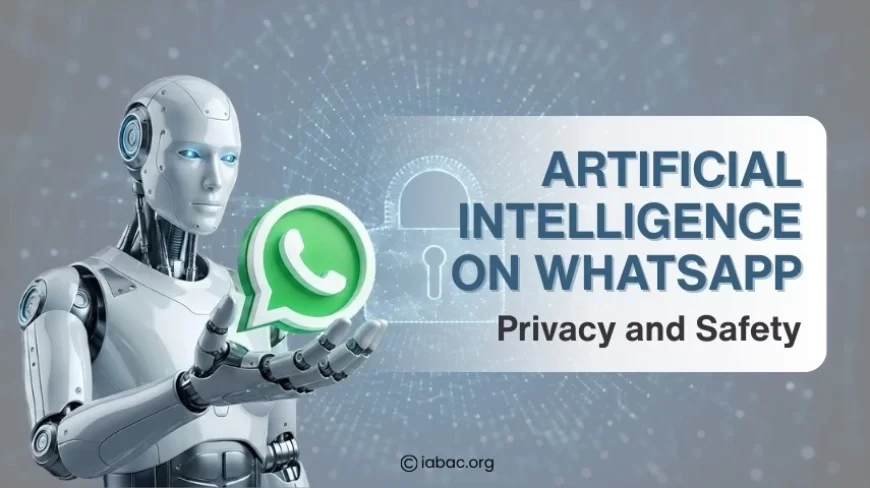
Artificial Intelligence on WhatsApp Privacy and Safety
Artificial intelligence on WhatsApp raises privacy and safety questions. Find out how AI works, encryption limits, features, user control, and security risks.

WhatsApp is more than just a messaging application. It is where people exchange personal thoughts, family updates, work information, and important documents. As WhatsApp introduces smarter systems, many users are attempting to understand what happens behind the screen. The most discussed topic on WhatsApp is artificial intelligence and its impact on privacy and safety.
People commonly notice new features without clear explanations. Some feel confused about how much information is processed. Others worry about whether messages stay private or if AI tools can see conversations. These concerns are natural because messaging apps are deeply personal spaces.
Artificial intelligence on WhatsApp privacy and safety can feel confusing without proper explanation. The following explanation describes how AI works, what information it can and cannot access, lesser-known features, and practical ways to stay safe while using WhatsApp, allowing users to feel informed, calm, and confident.
Understanding Artificial Intelligence on WhatsApp
Artificial intelligence is a type of technology that allows systems to recognise patterns and respond using rules and learning models. On WhatsApp, AI does not appear as a single button or character. Instead, it works in numerous small ways throughout the app.
Artificial Intelligence on WhatsApp supports the platform by:
-
Allowing the smooth delivery of messages to the right device.
-
Reduce spam and harmful behaviour.
-
Supporting automated responses and assistance tools.
-
Improving overall app stability.
The majority of this happens quietly. Users may not notice AI at work until they interact with a visible assistant or receive a security alert. This design ensures that WhatsApp remains trustworthy without interfering with normal conversations.
How AI Works Without Reading Your Messages
One common misconception is that AI reads chats like a human. In reality, the message content is protected during transmission. AI systems prioritise patterns over personal conversations.
AI may look at:
-
How often messages are sent
-
Whether activity looks unusual
-
System signals that suggest spam or fraud
AI does not sit and read private messages word for word. Artificial intelligence on WhatsApp operates within technical limitations, protecting message content while allowing the system to function safely.
This difference between message content and usage signals is important. It explains how AI can help without becoming intrusive.
Artificial Intelligence on WhatsApp and End-to-End Encryption
WhatsApp depends on end-to-end encryption to ensure message privacy. This system ensures that only the sender and recipient can read the message. Even WhatsApp cannot see the actual content of chats as they are being delivered. This protection applies regardless of whether the messages are personal, professional, or shared in groups.
Artificial intelligence on WhatsApp does not break or weaken this encryption. Instead of focusing on message content, AI provides security in other ways. It points out how the app is used rather than what is said.
AI typically pays attention to:
-
Account behavior patterns, such as sudden changes in activity that may signal misuse
-
Device-level security checks, which help detect unfamiliar devices or risky access attempts
-
Network-level signals, including unusual traffic that may indicate spam or fraud
Encryption acts like a sealed envelope, protecting the message itself. AI acts more like a guard around the system, watching for suspicious behaviour without opening the envelope. Together, they form a balanced setup where conversations stay private while the platform remains protected from abuse.
On-Device AI vs Server-Based AI
Not all AI operates in the same environment. Some processes happen directly on the user's device, while others take place on secure servers.
On-device AI may:
-
Help organize chats
-
Support basic suggestions
-
Improve app performance locally
Server-based AI may:
-
Detect large-scale spam activity
-
Protect against fraud attempts
-
Monitor system-wide threats
Artificial Intelligence on WhatsApp uses both approaches carefully. This reduces risk while maintaining speed and reliability.
What Are the Hidden Features of WhatsApp?
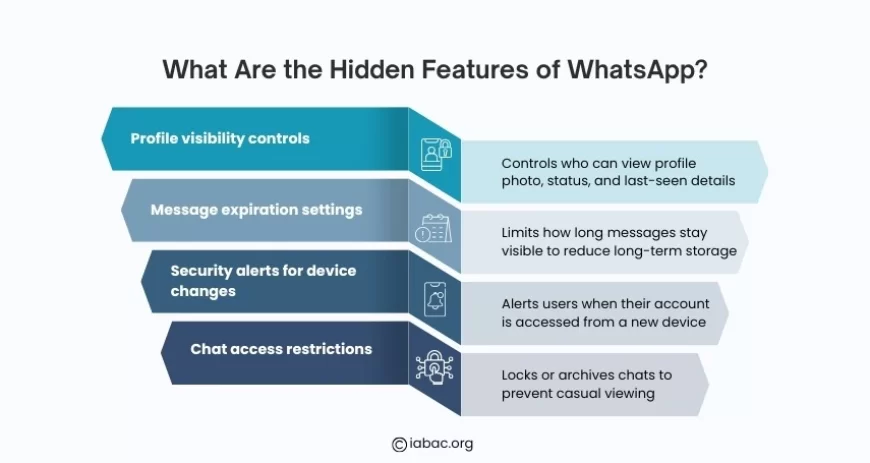
WhatsApp has several features that are not always visible during normal use. These tools are intended to operate quietly in the background, giving users greater control without making the app appear complicated or crowded. Because they are not frequently highlighted, many people are not aware of them until a specific situation brings them to light.
Some commonly overlooked features include:
-
Profile visibility controls, which allow users to decide who can see their profile photo, status, or last-seen information
-
Message expiration settings, which help reduce long-term message storage by limiting how long chats remain visible
-
Security alerts for device changes, which notify users when their account is accessed from a new or unfamiliar device
-
Chat access restrictions, such as locking or archiving chats to prevent casual viewing
Artificial Intelligence on WhatsApp supports these features by observing general usage patterns and identifying activity that does not seem normal. This allows the system to respond quickly to potential risks while maintaining ongoing conversations. Many users only find these hidden tools when they need more privacy or protection, so they are valuable safeguards built into the application.
What Is the AI Feature in WhatsApp?
WhatsApp's AI features refer to a collection of tools and systems designed to improve messaging speed, security, and reliability. Some of these tools are obvious because users interact with them directly, while others operate quietly in the background to protect the platform.
Visible AI features may include:
-
Automated replies, which provide quick responses without manual typing
-
Chat-based assistance, which helps answer simple questions or guide actions
-
Smart suggestions, which offer helpful prompts based on conversation flow
Behind the scenes, background AI systems focus on:
-
Spam filtering, which reduces unwanted or harmful messages
-
Fraud prevention, which helps identify suspicious activity early
-
Account protection, which supports the safety of user profiles
Artificial intelligence on WhatsApp becomes interactive only when users choose to engage with these tools. Most AI activity remains behind the scenes, working continuously to maintain system health, improve reliability, and support a safer messaging environment.
Personal Chats vs Business Chats
AI behaves differently in WhatsApp depending on whether a conversation is personal or business-related. This difference exists to protect private communication while still allowing helpful automation where it makes sense.
In personal chats, privacy comes first. AI support works primarily in the background, focussing on keeping the platform secure and stable. Messages remain secure, and AI does not become involved in conversations unless a safety concern occurs. The goal is to allow people to communicate freely without feeling monitored or interrupted.
In business chats, AI plays a more visible role. Businesses commonly use automation to respond quickly and handle large volumes of messages. As a result, users may encounter automated responses, guided responses, or assistance tools that assist with common questions such as order updates or support requests.
There is a reason why this separation exists. Personal conversations are treated as private, whereas business chats are intended for efficiency and support. Understanding this distinction explains why some WhatsApp conversations feel more automated than others and informs users about what to expect when messaging various types of accounts.
Does WhatsApp Have a Hidden Chat Feature?
WhatsApp offers several tools to help you reduce the visibility of specific conversations without completely removing them. These options are useful when users want to keep chats out of sight while still having access to them when needed. Instead of completely hiding chats, these tools prioritise controlled access and structure.
The main options include:
-
Archived chats, which move selected conversations away from the main chat screen
-
Locked chats, which require authentication before they can be opened
-
Muted chats, which silence notifications and reduce distractions
WhatsApp's artificial intelligence may help by identifying which chats are used less frequently and suggesting better organisation. However, the user always maintains final control. These hidden chat options help protect conversations from casual viewing, especially on shared or frequently accessed devices, by adding an extra layer of privacy while not deleting any messages.
Is It Safe to Chat With AI in WhatsApp?
Chatting with AI inside WhatsApp may feel different than talking to a human, especially for users who are new to these tools. The safety of these AI features is largely affected by how they are used and the type of information shared during the interaction.
When users chat with AI:
-
Messages may be processed so the system can understand questions and generate useful replies
-
Some data may be used temporarily to improve response quality and accuracy
-
Security rules remain in place, helping prevent misuse or unauthorized access
Artificial intelligence on WhatsApp works best when it is used for general support, simple questions, or basic assistance. Avoiding passing on personal, financial, or sensitive information provides an additional layer of protection. When used properly, AI chat tools can be useful without risking privacy or safety.
Is WhatsApp 100% Private?
No online service can guarantee absolute privacy. WhatsApp provides strong security, but how private a chat remains depends on both the app and what users do.
WhatsApp uses end-to-end encryption to protect message content. This means that the words you send are scrambled so that only the sender and receiver can read them while the message is transmitted between devices. However, some additional information, known as metadata, can be viewed or used to keep the app operational and secure. Metadata includes information such as who you messaged, the time of the message, and how frequently you communicate with someone. It does not contain the message text itself.
Other things that affect privacy:
-
Device security — If someone has access to your phone, they can read messages even if encryption is strong. Use device passcodes or biometric locks.
-
Backups — Chats backed up to cloud services may be handled differently than messages on the device. Encrypted backups are safer; if backups are not encrypted, they may be more exposed.
-
Shared devices — Using WhatsApp on a phone others share can expose conversations. Archiving, locking chats, and logging out of linked devices help.
-
Third-party apps and modified versions — Apps that claim extra features can weaken security. Stick to the official WhatsApp app.
-
Screenshots and forwarding — Anyone in a chat can copy or forward messages, which is outside the app’s control.
-
Group chats and business accounts — Group members and some business features can change how widely information is shared. Think before posting personal details.
-
Legal or safety requests — In some cases, platforms may need to respond to lawful requests or safety investigations. This can affect certain types of stored data.
Artificial intelligence on WhatsApp works inside these limits. It helps spot spam, fraud, or other risky behaviour by using patterns and signals, usually without reading message text. That helps protect users, but it does not replace good personal security habits.
Simple steps to improve privacy:
-
Turn on two-step verification.
-
Use an app lock or phone passcode.
-
Keep the app and phone updated.
-
Enable encrypted backups if available.
-
Don’t share verification codes or sensitive details in chats.
These actions make privacy protections much stronger and reduce the chance that messages or account details are exposed.
Can We Turn Off AI in WhatsApp?
WhatsApp utilises AI to support safety, stability, and smooth performance, so core AI systems cannot be turned off completely. These systems detect spam, prevent fraud, and protect accounts while operating automatically in the background.
However, users maintain control over how much they interact with AI features. While the basic safety systems remain operational, direct and visible AI interactions are often limited.
Users can:
-
Avoid AI chat tools by choosing not to start or continue conversations with AI-powered assistants
-
Adjust privacy settings to control how data is shared and who can contact them
-
Manage permissions at the app or device level, such as access to contacts or storage
This approach allows artificial intelligence on WhatsApp to continue supporting security and system health, while users decide how involved they want AI to be in their daily messaging experience.
Can Hackers See Your WhatsApp?
Hackers rarely gain access to WhatsApp by breaking the encryption. Instead, they look for easy vulnerabilities caused by poor security practices. When attackers succeed, it is usually because they trick users or exploit unsecured devices rather than bypass the app's basic safeguards.
Common risks include:
-
Sharing verification codes, which can give attackers control of an account
-
Using unsecured or shared devices, where messages can be viewed by others
-
Falling for fake messages, such as links that imitate trusted contacts or services
Artificial intelligence on WhatsApp helps reduce these risks by spotting unusual activity, blocking suspicious behaviour, and limiting the spread of harmful messages. Even with these protections, users remain the strongest line of defence. Careful handling of codes, cautious clicking, and secure device settings make it much harder for hackers to access WhatsApp accounts.
How AI Helps With Account Protection and Recovery
AI helps to secure WhatsApp accounts by looking for signs that something is wrong. Instead of waiting for a problem to worsen, AI systems look for unusual patterns, such as unexpected login attempts, sudden changes in device access, or activity that does not fit with normal usage.
When suspicious behaviour is detected:
-
Access may be limited to prevent further misuse
-
Extra verification steps may be triggered
-
Users may receive alerts or guidance to secure their account
WhatsApp's artificial intelligence works in the background to prevent damage from spreading. These systems allow users to regain control more quickly and reduce the impact of unauthorised access, making account recovery easier and less stressful.
Concerns about artificial intelligence are frequently sparked by incomplete or unclear information. When people do not understand how AI works, it is easy to imagine constant surveillance or a loss of privacy. Clearing up common myths helps to establish realistic expectations.
-
Myth: AI reads every message
Reality: Message content is protected by encryption. AI systems do not read chats the way people do. -
Myth: AI watches users all the time
Reality: AI focuses on patterns such as unusual activity or spam signals, not on following individual conversations.
Understanding these differences helps reduce unnecessary worry and allows users to see artificial intelligence on WhatsApp as a support system rather than a surveillance tool.
Responsible Use Builds Trust
People's trust in any digital platform grows as they learn how its tools work and what their purpose is. WhatsApp's artificial intelligence is intended to support safety, reliability, and smooth communication, rather than to watch or monitor personal conversations.
Using WhatsApp responsibly helps improve these protections. Simple habits make a meaningful difference, such as:
-
Keeping devices secure with screen locks or biometric protection
-
Reviewing settings regularly to stay aware of privacy and security options
-
Staying alert to unusual activity, like unexpected login alerts or unfamiliar messages
When users combine awareness and careful usage, trust naturally grows. This shared responsibility between technology and users contributes to a safer and more reliable messaging environment.
Why Learning About AI and Privacy Matters
AI is becoming part of everyday communication, often working quietly in the background of tools people use daily. When users understand how AI functions, they are better prepared to make informed choices instead of reacting with confusion or concern.
Learning about artificial intelligence on WhatsApp helps build a clearer picture of how modern messaging platforms handle privacy, safety, and user data. This awareness does not stop with one app; it affects how people approach digital tools in general, encouraging thoughtful use and stronger personal security habits.
WhatsApp will continue to evolve, and AI will remain part of its system. Privacy and safety depend on technology and user awareness working together. For those who want to understand artificial intelligence, data responsibility, and ethical technology use at a deeper level, professional certification programmes offer structured learning. Start your journey today by exploring our certification programmes and strengthening your understanding of AI systems shaping modern communication.