




























































Tools Every Entry-Level Business Analyst Must Know in 2026
Tools every entry-level business analyst must know in 2026, including Excel, SQL, Power BI, and practical ways to apply them for real business tasks daily.


You’re sitting in an interview for a business analytics role, and the recruiter asks, “Which tools have you actually used?”
You pause… Because you’ve learned the concepts but haven’t worked much with tools.
This is where most entry-level business analysts get stuck.
Understanding business analytics concepts is important, but applying them in real scenarios is what sets you apart.
Recruiters want to see how you work with data, generate insights, and use tools confidently.
In today’s roles, tools bring business analytics to life.
They help you turn knowledge into real output and contribute from day one.
If you want to stand out, the tools you know can make all the difference.
Why Tools Matter for Entry-Level Business Analysts
Business analysts are responsible for connecting data with business decisions. Without the right tools, this process becomes slower, less accurate, and harder to communicate. Tools provide structure to analysis and make insights easier to interpret and act upon.
They also allow analysts to handle increasing data complexity without getting overwhelmed, which is critical in fast-paced business environments.
Some key advantages of using the right tools include:
-
Faster processing of business data with improved accuracy and structured outputs
-
Clear communication of insights through visuals that support stakeholder understanding
-
Reduced reliance on technical teams for accessing and preparing relevant datasets
-
Better coordination across teams working on shared goals and deliverables
Core Tools Every Entry-Level Business Analyst Should Master
Data analysis sits at the center of a business analyst’s responsibilities. At the entry level, your ability to work with data directly influences how quickly you can contribute to business needs.
Microsoft Excel
Excel remains one of the most practical tools for beginners due to its accessibility and versatility. It is often the first step in understanding how data behaves and how insights can be generated quickly.
It supports structured analysis without requiring complex technical setups, making it ideal for early-stage learning and execution.
SQL (Structured Query Language)
SQL gives you direct access to data stored in databases, allowing you to retrieve exactly what you need. This independence improves efficiency and makes your workflow more reliable.
It also helps you understand how data is structured within systems, which is valuable when working with larger datasets.
Python (Basic Level)
Python adds another layer of capability, especially when working with large datasets or repetitive processes. While not mandatory for every role, it strengthens your ability to automate and scale analysis.
Even basic usage can improve how efficiently you handle complex data tasks.
Data Visualization Tools for Clear Insights
Once data is analyzed, the next step is presenting it in a way that drives action. Visualization tools help simplify complex information and make it easier for stakeholders to understand key insights.
Power BI
Power BI is widely used for building dashboards that provide real-time insights. It allows analysts to combine multiple data sources and present them in a structured format.
Its ability to create interactive reports makes it highly effective in business environments where decisions need to be made quickly.
Tableau
Tableau is known for its strong visual storytelling capabilities. It helps analysts present data in a way that highlights patterns, trends, and insights clearly.
This makes it especially useful when communicating findings to non-technical stakeholders.
Requirement Gathering and Documentation Tools
A business analyst’s role goes beyond data. Capturing business needs accurately and documenting them clearly is equally important. Strong documentation ensures alignment and reduces misunderstandings during execution.
Microsoft Word and Excel
These tools are commonly used to create structured documents that define requirements and processes. They help maintain clarity across different stages of a project.
They are essential for organizing information in a way that both technical and non-technical stakeholders can understand.
Confluence
Confluence acts as a centralized space where teams can manage and access documentation. It supports collaboration and ensures that information stays updated.
This improves transparency and helps teams stay aligned throughout the project lifecycle.
Process Modeling and Diagramming Tools
Explaining workflows through text alone can be time-consuming and unclear. Diagramming tools help simplify complex processes and make them easier to understand.
Microsoft Visio
Visio is widely used to create process diagrams and system flows. It helps break down complex operations into clear visual representations.
This improves communication and ensures that all stakeholders understand how processes function.
Lucidchart
Lucidchart offers a more flexible and collaborative approach to diagramming. Its cloud-based nature allows teams to work together in real time.
It is especially useful in environments where quick collaboration and feedback are required.
Project Management and Collaboration Tools
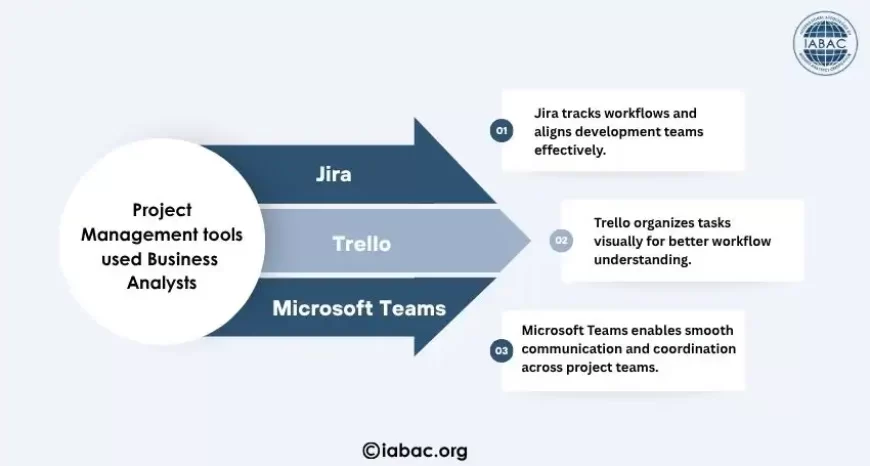
Business analysts work closely with multiple teams, making coordination a critical part of the role. Project management tools help track progress, manage tasks, and maintain clarity across teams.
Jira
Jira is widely used in agile environments to manage workflows and track progress. It helps analysts stay aligned with development teams and ensures that requirements are properly implemented.
Understanding Jira also helps you adapt quickly to agile project structures.
Trello
Trello provides a simple way to organize tasks visually. It is useful for managing workflows and understanding how tasks move across different stages.
It is particularly helpful for beginners who are learning how to manage projects effectively.
Slack or Microsoft Teams
Communication tools play an important role in maintaining coordination across teams. They enable quick discussions, updates, and issue resolution.
This ensures smoother execution and reduces delays caused by communication gaps.
Building Hands-On Experience with Tools
Knowing tools is only the starting point. What truly matters is how you apply them to solve business problems. Employers look for candidates who can demonstrate practical usage, not just familiarity.
The best way to build this capability is by working on realistic scenarios that reflect actual business challenges.
You can strengthen your practical exposure by:
-
Creating dashboards using sample datasets to demonstrate structured analytical thinking
-
Practicing SQL queries on public datasets to improve real-world data handling ability
-
Building mock business cases and documenting requirements based on those scenarios
-
Designing process flow diagrams that clearly represent workflows and decision paths
Over time, this approach helps you build a portfolio that reflects your ability to execute, not just understand.
Common Mistakes to Avoid When Learning Tools
Many beginners focus heavily on tools without understanding how they fit into business contexts. This often leads to fragmented knowledge that is difficult to apply in real situations.
The goal should be depth and application, not just coverage.
Some common mistakes include:
-
Learning tools without linking them to actual business problems and use cases
-
Trying to cover multiple tools at once without gaining strong proficiency in any one
-
Focusing only on technical execution while ignoring the interpretation of results
-
Relying on guided tutorials without practicing independent problem-solving
Avoiding these mistakes helps you build skills that are practical and directly relevant to job roles.
Emerging Tools and Trends in 2026
The role of business analysts continues to evolve with advancements in technology. New tools are making analysis faster, more automated, and more integrated into business workflows.
Staying aware of these changes helps you remain competitive and adaptable.
Some key trends shaping the role include:
-
AI-driven tools that accelerate analysis and provide faster insight generation
-
Low-code platforms that allow analysts to build solutions without deep programming knowledge
-
Cloud-based systems that support scalable data handling and remote accessibility
-
Automation tools that reduce manual effort in repetitive analytical tasks
These developments are redefining how analysts contribute to organizations.
How to Choose the Right Tools as a Beginner
With so many tools available, it is important to avoid unnecessary complexity. A focused approach helps you build strong fundamentals and progress more effectively.
Instead of trying to learn everything, prioritize tools that directly support core business analysis tasks.
You can begin by:
-
Building strong foundational skills using Excel and SQL for data analysis
-
Learning one visualization tool, like Power BI or Tableau, for reporting
-
Understanding one project management tool, such as Jira, for workflow tracking
-
Expanding gradually into advanced tools based on your career direction
This approach ensures steady progress without overwhelming your learning process.
Mastering the right tools as an entry-level business analyst in 2026 creates a strong foundation for long-term careers. These tools help you work with data effectively, communicate insights clearly, and contribute meaningfully to business outcomes.
As you continue to learn and apply these tools in practical scenarios, your ability to solve problems and deliver value will grow significantly.
A well-structured business analytics certification can strengthen this journey by helping you apply these tools in real business contexts while preparing you for professional opportunities.