






















































AI Agents vs ChatGPT: What's the Difference in 2026?
Wondering how AI agents differ from Chat GPT? Chat GPT generates answers — agents take action across your tools and systems. Full comparison, use cases, and 2026 verdict.

You paste a transcribed sales call into ChatGPT. In seconds, it spits out a sharp qualification summary — who the prospect is, what they need, how ready they are to buy. Impressive. Now open your CRM, find the right contact record, paste the notes in, switch to Slack, tag the account executive, draft the follow-up email, and set a reminder.
That gap between getting a great answer and completing the actual task — is exactly where the difference between AI agents and ChatGPT matters most.
ChatGPT handled the reasoning. You handled everything else.
According to OpenAI, ChatGPT now has over 900 million weekly active users. Most of them are still acting as the bridge between what the AI produces and what their business systems actually need. AI agents exist to close that bridge.
In this guide, you'll learn:
- What ChatGPT is and where it genuinely excels
- What AI agents are and how they work differently
- A direct feature comparison (with table)
- When to use each — and when to use both together
- Real-world workflow examples you can replicate
- How ChatGPT's "Agent Mode" fits into all of this
What is ChatGPT?
ChatGPT is a conversational AI interface built on OpenAI's large language models (LLMs). You send it a message, it processes your input using patterns learned from vast amounts of text, and it generates a response — all within a single turn.
What makes ChatGPT powerful is how naturally it handles language. It can draft emails, summarise documents, write code, answer complex questions, brainstorm ideas, and analyse data — all through a simple chat interface. It feels less like software and more like a very well-read colleague who's always available.
Where ChatGPT excels:
- Drafting and editing written content
- Answering one-off questions and research queries
- Analysing documents you upload to it
- Explaining complex topics in plain language
- Generating creative outputs (marketing copy, briefs, outlines)
- Coding assistance and debugging
The key characteristic of ChatGPT is that it's reactive and session-based. You give it a prompt, it gives you an output. The quality of that output depends heavily on the quality of your prompt. When the session ends, ChatGPT doesn't remember what you discussed (unless memory is enabled) and it doesn't take any action in other systems on your behalf.
That's not a flaw it's a design choice. For exploratory, one-off tasks where a human judges and acts on the output, ChatGPT is exactly what you need.
In 2025, OpenAI introduced ChatGPT Agent Mode — a feature that lets ChatGPT browse the web, interact with computer interfaces, and perform multi-step tasks. We'll cover how this differs from "true" AI agents later in this article.
What are AI Agents?
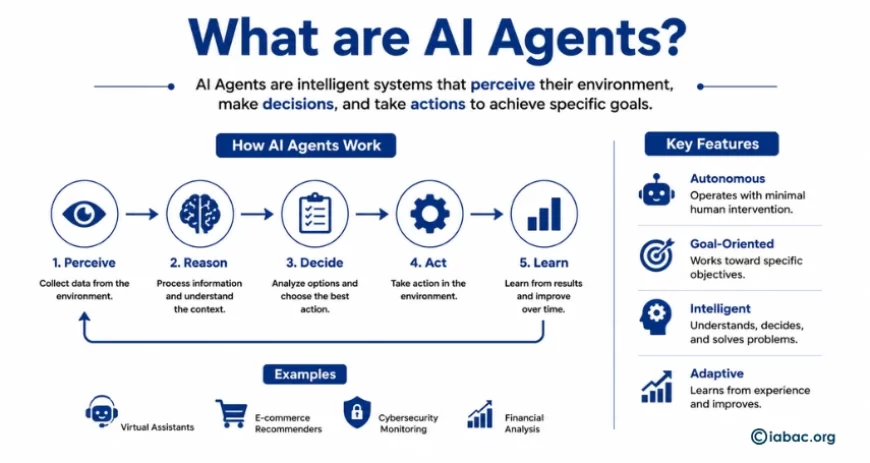
An AI agent is an autonomous software system that uses an AI model as its reasoning core, but can also act — using tools, calling APIs, reading and writing to external systems, and executing multi-step workflows without constant human input.
While ChatGPT waits for your next message, an AI agent is given a goal and figures out the steps to achieve it. Where ChatGPT generates an output for you to act on, an AI agent takes action itself.
The core properties that define an AI agent:
- Memory: Agents maintain context across sessions — they remember what happened in the last run, not just the current conversation.
- Tool use: Agents can call external tools — search the web, query a database, write to a CRM, send a Slack message, run code.
- Planning: Agents break a complex goal down into sub-tasks and execute them in sequence.
- Autonomy: Agents can run on a schedule or trigger, completing workflows without a human initiating each step.
- Multi-system integration: A single agent can touch Salesforce, Gmail, Slack, and your internal database in a single workflow run.
Examples of what an AI agent does:
- When a lead submits a demo request form, the agent qualifies them against your ICP, enriches their profile from LinkedIn and Clearbit, creates a CRM record, assigns it to the right sales rep, and sends a personalised outreach email all within 90 seconds of form submission, with no human involved.
- When a support ticket arrives, the agent reads it, classifies the issue, checks the knowledge base for a resolution, attempts to resolve it automatically, and only escalates to a human agent if it can't.
- When a meeting ends, the agent transcribes the recording, extracts action items, creates tasks in your project management tool, and sends a summary to the relevant Slack channel.
The key insight: AI agents are not primarily about better AI. They're about connecting AI reasoning to real-world systems and actions.
AI Agents vs ChatGPT: Key Differences
Here's how the two compare across the dimensions that matter for business use:
|
Feature |
ChatGPT |
AI Agent |
|
Memory |
Session-based (optional persistent memory) |
Cross-session, state-aware |
|
Tool use |
Limited (web search, code interpreter) |
Unlimited via APIs and integrations |
|
Autonomy |
Reactive — needs human prompt |
Proactive — trigger or schedule-based |
|
Human oversight |
Required for every action |
Optional — can run fully unattended |
|
Multi-step execution |
Manual — human does each step |
Automatic — agent chains steps |
|
System integrations |
Minimal (uploads, plugins) |
Deep — CRM, email, Slack, databases |
|
Best for |
Exploratory, creative, one-off tasks |
Recurring, multi-system, scalable workflows |
|
Setup complexity |
Near-zero — just open and type |
Low to medium — requires workflow design |
|
Pricing model |
Subscription ($20–$200/mo) |
Subscription + API usage + platform cost |
|
Output type |
Text / code / analysis |
Actions in real systems + optional text |
The fundamental difference comes down to one question: does a human need to be in the loop between every step?
With ChatGPT, the answer is always yes. You read the output, decide what to do with it, and take the next action yourself. The AI is a thinking partner.
With an AI agent, the answer can be no. You define the goal and the rules once. The agent executes the workflow repeatedly, at scale, without you touching it.
When to Use ChatGPT?
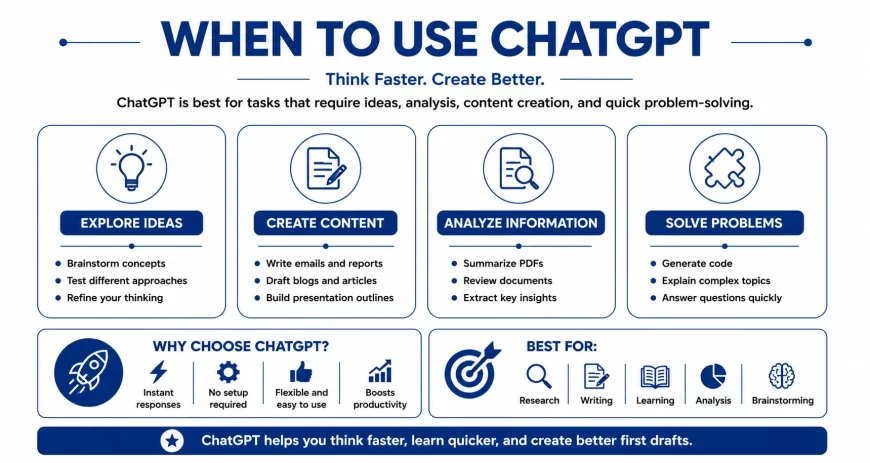
ChatGPT is the right choice when:
The task is exploratory or one-off. You're working through a new problem, trying different framings, iterating on output quality. The conversational back-and-forth is the point you need to think alongside the AI, not hand off a process to it.
Creative judgment is required. Writing a brand manifesto, crafting a pitch deck narrative, or developing a creative brief involves taste and subjective judgment. ChatGPT generates the material; you make the call. That human-in-the-loop step isn't a bottleneck it's the value.
You're processing a document or dataset. Analysing a PDF, summarising a lengthy report, extracting key insights from a spreadsheet these are ideal ChatGPT tasks. Upload the file, ask your question, get a focused answer.
The output is the deliverable. If what you need is a well-written email, a polished job description, a SQL query, or an explanation of a complex topic ChatGPT produces the final thing. No further system action needed.
You need speed and flexibility. ChatGPT requires zero setup. You have an idea, you type, you get a response. For the vast majority of knowledge work tasks that arise unexpectedly throughout the day, ChatGPT's speed and accessibility beat any specialised tool.
Use ChatGPT to think faster and produce better first drafts. Don't use it as a substitute for the workflow execution that comes after.
When to Use AI Agents?
The task is recurring. If you're doing the same thing — qualifying leads, routing support tickets, syncing data between systems, generating weekly reports — more than once a week, it's a candidate for an agent. The agent executes the same workflow reliably at scale without anyone acting as the relay.
Multiple systems are involved. The moment a workflow requires touching more than one platform (write to CRM and send a Slack notification and update a spreadsheet), you've entered agent territory. Humans are poor at multi-system coordination at scale; agents are excellent at it.
Speed between steps matters. AI agents can execute a 10-step workflow in under two minutes. A human doing the same workflow — switching between tabs, logging into systems, copy-pasting data — takes 20–30 minutes. For time-sensitive processes like lead response, that speed difference is a competitive advantage.
You want to scale without headcount. The same agent that handles 10 lead qualification tasks a day can handle 1,000 without any change in cost structure. That's the fundamental economics of agents: they break the link between business volume and human labour.
The process has clear rules. Agents need defined logic: if X, then Y. The more structured your workflow (if lead score > 70 AND company size > 50, assign to enterprise team), the more reliably an agent executes it.
Use AI agents to automate the work that comes after thinking. Let ChatGPT do the reasoning; let agents handle the execution.
Real-World Workflow Examples
Scenario 1: The Sales Intelligence Pipeline
Without agents: Sales rep records a call → transcribes it in Otter.ai → pastes transcript into ChatGPT → reads the summary → manually updates CRM → writes a follow-up Slack message to the AE → drafts a follow-up email → sends it
With agents: Sales rep records a call → agent transcribes, extracts BANT signals, scores the lead, updates Salesforce, notifies the AE in Slack with the summary, and sends a personalized follow-up email — automatically, within 5 minutes of the call ending.
ChatGPT still powers the reasoning layer (extracting BANT, drafting the email copy). The agent handles every system action that follows.
Scenario 2: Customer Support Triage
Without agents: Support ticket arrives → team member reads it → categorises it → assigns it to the right queue → first responder looks up the knowledge base → writes a response
With agents: Support ticket arrives → agent classifies the issue, checks the knowledge base, attempts an automated resolution using approved response templates, and only creates a human task if confidence is below a threshold. Resolution time drops from hours to minutes for tier-1 issues.
Scenario 3: Content Publishing Workflow
Without agents: Content writer produces a draft → editor reviews → marketing manager formats it for the CMS → publishes → shares it to social media → sends the newsletter
With agents: Writer finalises the draft → agent runs it through SEO scoring, formats it for WordPress, schedules publication, drafts social variants for three platforms, and queues the newsletter excerpt — all triggered by a single "approved" status change in Notion.
In every case, ChatGPT and the AI agent work together. ChatGPT handles the language and reasoning tasks. The agent handles coordination, execution, and system updates.
ChatGPT Agent Mode: Is It the Same as an AI Agent?
This is one of the most common points of confusion — and the distinction matters.
ChatGPT Agent Mode (sometimes called "ChatGPT Operator" or "Computer Use") is a feature within the ChatGPT product that allows the model to browse the web, interact with graphical interfaces, fill out forms, and complete multi-step tasks — like booking a flight or compiling a research report.
It is genuinely impressive and meaningfully extends what ChatGPT can do. But it's not the same as a standalone AI agent:
|
ChatGPT |
ChatGPT Agent Mode |
Standalone AI Agent |
|
Where it runs |
Inside the ChatGPT interface |
On your infrastructure or agent platform |
|
Initiates tasks |
You ask it in a chat session |
Triggered by events, schedules, or API calls |
|
System access |
Browser / computer UI only |
Direct API connections to any business system |
|
Memory |
Session-scoped |
Persistent across unlimited runs |
|
Custom logic |
Constrained by ChatGPT's interface |
Fully programmable |
|
Unattended operation |
No — requires you to be present |
Yes — runs in the background 24/7 |
Think of it this way: ChatGPT Agent Mode is like a very capable assistant sitting at your computer who can browse the web for you while you watch. A standalone AI agent is like hiring someone who works a full shift independently while you focus on other things and they use direct integrations to your business tools, not just what's visible in a browser.
For most business use cases, standalone agents built on platforms like Make, n8n, or custom LangChain/AutoGPT implementations offer far more flexibility, reliability, and depth of integration than ChatGPT Agent Mode.
Which is Better AI Agents or ChatGPT?
Neither. They solve fundamentally different problems, and framing the question as "which is better" leads to the wrong decision.
Here's the honest framework for choosing:
Choose ChatGPT when the task is:
- Exploratory or creative
- One-off or unpredictable
- Dependent on human judgment before action
- About producing a deliverable (text, analysis, code) rather than executing a process
Choose an AI agent when the task is:
- Recurring (daily, weekly, at-trigger)
- Multi-system (touches more than one platform)
- Executable without per-step human judgment
- About volume and reliability at scale
In practice, the strongest AI-powered workflows use both:
ChatGPT (or any frontier LLM) handles the reasoning — understanding context, making judgment calls, generating language. The agent handles the execution — taking that reasoning and turning it into real-world actions across your business systems.
The sales qualification example above is the model: ChatGPT reads the transcript and extracts meaning; the agent takes that meaning and acts on it in Salesforce, Slack, and email.
Frequently Asked Questions
1) Can ChatGPT act as an AI agent?
Not in the traditional sense. ChatGPT's Agent Mode gives it some agentic capabilities (web browsing, UI interaction), but it lacks persistent memory across sessions, direct API integration with business systems, and the ability to run unattended on a schedule or trigger. For recurring, multi-system business workflows, you need a purpose-built agent.
2) What's the difference between AI agents and automation tools like Zapier?
Traditional automation tools (Zapier, Make) execute rigid, rule-based workflows: if X happens, do Y. AI agents add a reasoning layer — they can handle ambiguous inputs, make judgment calls within defined parameters, and adapt their behaviour based on context. An AI agent doesn't just route data; it understands the data and decides what to do with it.
3) Do AI agents replace ChatGPT?
No. They're complementary. Most AI agents use a large language model (often the same one powering ChatGPT) as their reasoning core. The agent provides the infrastructure and integrations; the LLM provides the intelligence. Removing ChatGPT (or an equivalent LLM) from the equation leaves you with an automation tool that can't handle nuance.
4) What is agentic AI?
Agentic AI refers to AI systems that can pursue goals autonomously over multiple steps, using tools and making decisions without constant human instruction. It's the umbrella term for AI agents, multi-agent systems, and AI-powered workflows. It represents the current direction of the industry: moving from AI that answers questions to AI that completes tasks.
5) Which is better for small businesses?
For most small businesses, ChatGPT is the right starting point — zero setup cost, immediate productivity gains, no technical overhead. As you identify recurring workflows that consume significant time (lead handling, customer onboarding, reporting), AI agents become cost-effective even at small scale. Many agent platforms offer free tiers or low-cost plans that pay for themselves quickly in saved hours.
6) Is it difficult to build an AI agent?
It depends on the complexity of the workflow. Simple agents — one trigger, three actions, one system — can be built in platforms like Make, Zapier AI, or Lindy in under an hour with no coding. Complex agents with conditional logic, multi-system integration, and custom LLM prompting typically require a few days of work by someone technically comfortable with APIs. The landscape is evolving quickly toward lower-code agent building.
The simplest way to remember the difference: ChatGPT helps you think. AI agents do the work.
ChatGPT is your always-available thinking partner — fast, flexible, and excellent at the reasoning tasks that used to require expensive expertise. AI agents are your always-available workforce — reliable, scalable, and excellent at executing the multi-step workflows that used to require human coordination.
The teams winning with AI in 2026 aren't choosing between the two. They're using ChatGPT to accelerate individual knowledge work, and deploying AI agents to automate the processes that sit between that work and their business systems.
If you're just getting started, begin with ChatGPT for daily tasks. Then look at your recurring workflows — anything you do the same way more than twice a week — and ask whether an agent could handle it. That's usually where the biggest gains are.