

























































What Is Model Context Protocol (MCP)?
Learn what Model Context Protocol (MCP) is, how it connects AI with external tools, and why it is changing the way AI systems access data and perform tasks

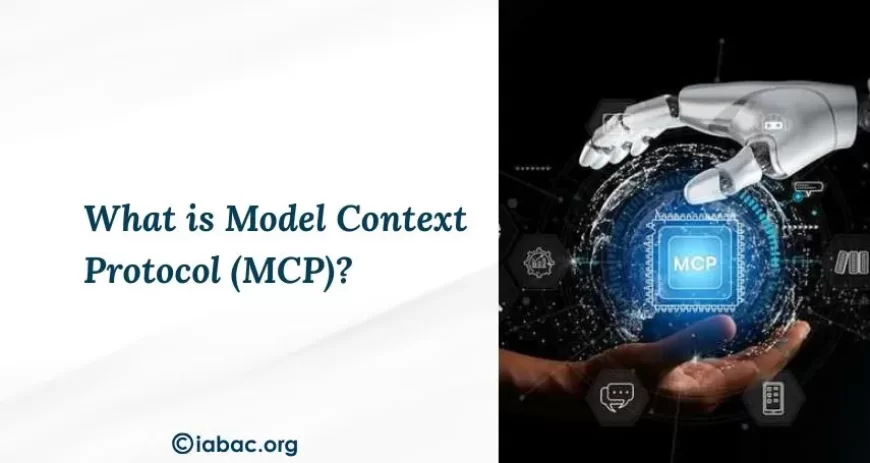
AI models are powerful, but on their own, they are limited. They cannot check live data, access your systems, or take real-world actions. Every connection to an external tool had to be custom-built, which was slow, expensive, and hard to maintain. Model Context Protocol, or MCP, was built to solve this. It is the open standard that lets AI models connect to any tool or data source through one universal protocol, making AI faster, smarter, and far more capable.
Understanding Model Context Protocol (MCP)?
Large language models are incredibly capable, but they come with a built-in limitation. Their knowledge is locked to whatever they were trained on. They cannot check live data, access a company database, send an email, or interact with any external system on their own.
Although MCP was introduced by Anthropic, it is an open standard designed for broad adoption across AI models, applications, and external services. Before it existed, every connection between an AI model and an external tool had to be built from scratch separately every single time. That approach was slow, messy, and nearly impossible to scale.
Think of it like a USB-C port for AI. Just as USB-C became the one standard connector that works across phones, laptops, and accessories, MCP becomes the one standard that lets any AI model talk to any external system, whether that means pulling data from a database, reading a file, or triggering an action in a third-party application.
The Problem MCP Was Built to Solve
Before this standard existed, connecting an AI model to an external tool was never simple. Every single connection had to be built from scratch.
- If you wanted Claude to access Slack, someone had to build a custom connector.
- If you then wanted it to also access GitHub, that was another connector entirely.
- If a different AI model also needed access to both those tools, someone had to build two more.
Imagine doing this across dozens of AI models and hundreds of tools. The number of custom connections required grows rapidly, and every single one needs to be maintained, updated, and secured separately.
Teams building AI systems ran into the same frustrating issues over and over:
- Every time a tool updated its system, the custom connection to the AI model would break and had to be fixed manually.
- Developers had to hardcode which tools were available because there was no standard way for the model to discover them on its own.
- Each integration had its own security setup, making it extremely hard to manage access and permissions across a growing number of connections.
- If you wanted to reuse the same AI capability with a different tool, you had to rebuild the connector from scratch all over again.
MCP solves this by introducing one shared standard. Instead of building a unique connection between every AI model and every tool, developers build one server for each tool and one client for each AI application. From that point, any AI model can connect to any tool because they all speak the same protocol.
The Core Architecture of MCP
MCP has three core components that work together to connect an AI model to the outside world.
The MCP host is the AI application the user interacts with, such as an AI-powered coding tool or a conversational assistant. It contains the AI model and is where every request begins.
The MCP client sits inside the host and acts as the go-between. When the AI needs something from an external source, the client translates that request into a format the protocol understands and sends it to the right place.
The MCP server is the external service on the other end. It receives the request, connects to the relevant data source or tool, and sends back a response that the AI can use.
User Request → AI Assistant (MCP Host) → MCP Client → MCP Server → External Tools & Data Sources
How the MCP process flows, step by step:
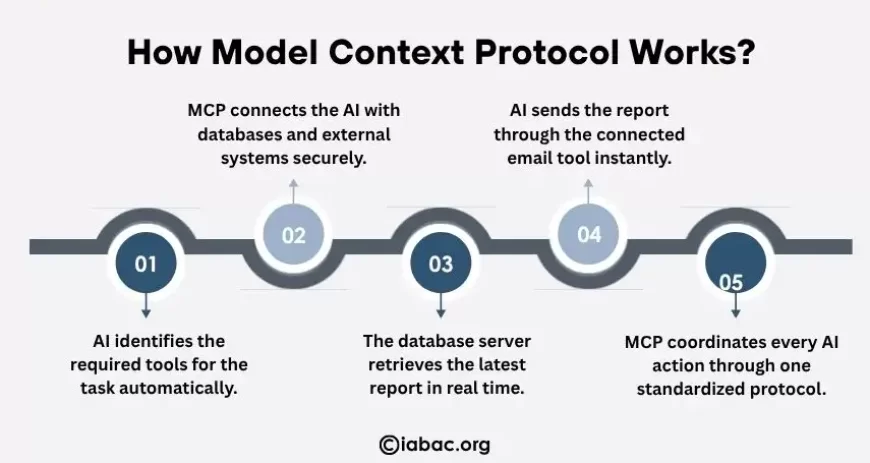
Say a user asks an AI assistant to pull the latest sales report from a database and email it to their manager. Here is what happens:
- The AI recognizes it cannot do this on its own and checks what tools are available through the client. It finds two: a database query tool and an email tool.
- It sends a request to the database tool. The server receives this, queries the database securely, and returns the report.
- Now with the report in hand, the AI calls the email tool, passes in the recipient and content, and the server sends the email.
- The AI confirms to the user: the report has been found and sent.
This back-and-forth between the AI and external tools, all coordinated through a single standardized protocol, is what makes MCP powerful.
The Three Primitives: Resources, Tools, and Prompts
The protocol organizes everything an AI model can access and work with into three simple categories. Think of these as the three things an AI model can do: read information, take action, and follow a structured starting point.
Resources
Resources are simply data. When an AI model needs to read something, whether that is a file, a record from a database, or a response from an external service, that is a resource.
Without access to resources, the model can only rely on what it was trained on, which can quickly become outdated or incomplete.
Tools
Tools are actions. While resources let the model read information, tools let it do something. An AI model can trigger actions like fetching live data, updating a support ticket, running a workflow, or deploying code.
The model does not just describe what should be done; it actually does it through the connected tool.
Prompts
Prompts are pre-built templates that help the AI model interact with a specific tool or data source more effectively.
Instead of figuring out how to approach a complex task from scratch every time, the model can use a prompt as a ready-made starting point that already knows the right format and structure for that particular job.
Together, resources, tools, and prompts give the AI model everything it needs: the information to understand a situation, the ability to act on it, and the structure to do it correctly.
MCP vs. Traditional APIs: What Makes It Different
APIs have been around for a long time, and they do allow systems to communicate with each other. But there is a key difference between what an API does and what this standard does.
An API only defines how to call a specific endpoint. The AI model still needs to know in advance that the API exists, how it works, and what to do with the data it gets back.
Every API is different, every authentication setup is different, and every integration has to be built and maintained separately.
Here is where MCP goes further:
- Automatic tool discovery: With a traditional API, the AI model has to be told in advance exactly what tools exist. With this standard, the model discovers available tools on its own at the moment it needs them.
- Structured data returns: An API returns raw data. This protocol returns data in a structured way that the AI model can immediately reason over and act on, without extra processing steps.
- Autonomous follow-up actions: With a traditional API, the application has to decide what to do next. Here, the AI model itself decides and carries out the next step automatically.
- Centralized security: Traditional APIs each have their own separate authentication and logging setup. This standard handles all of that centrally across every connected tool, making it far easier to manage and audit at scale.
MCP vs. RAG: What Is the Difference?
Both MCP and RAG are often mentioned together in AI conversations, but they do very different things.
RAG, which stands for Retrieval-Augmented Generation, is a technique that helps an AI model pull relevant information from a stored knowledge base before generating a response. It works well for question answering, summarizing documents, or pulling up information from a fixed set of content.
However, RAG has one important limitation: it can only read. It retrieves stored, indexed content and passes it to the model, but it cannot take any action based on what it finds.
This standard goes further. It does not just let the AI model read information; it lets the model act on it too. Through it, an AI model can fetch live data, update a record, trigger a workflow, or interact with an external system in real time.
Here is a simple breakdown of how the two differ:
- What they access: RAG works with stored, indexed content like documents and knowledge bases. This standard connects to live systems, APIs, and real-time data sources.
- What they can do: RAG can only retrieve and read information. MCP can both read information and take action on it.
- Data freshness: RAG depends on how recently the knowledge base was updated. This standard always pulls the most current data available at the time of the request.
- Best use case: RAG works best for answering questions from a fixed set of content. This standard works best when live data or real-world actions are involved.
That said, the two are not competitors. Many teams use RAG to handle questions based on stored documents and use MCP for tasks that require live data or real-world actions. Together, they give an AI model both a strong knowledge base and the ability to act in the world.
Who Can Benefit from MCP?
This standard is not just for large enterprises or advanced AI researchers. Its impact is felt across different types of people who build, use, or work alongside AI systems every day.
Developers
For developers, MCP removes one of the most repetitive parts of building AI applications: writing and maintaining custom integrations for every tool the AI needs to connect to. With this standard, a developer builds the connection once, and it works across any AI model that supports the protocol.
- Less time spent building and maintaining custom connectors for every new tool.
- Faster development cycles since the integration work is done once and reused across projects.
- A standardized structure that makes it easier to debug, update, and scale AI applications over time.
Businesses and Enterprises
For businesses, it makes deploying AI across existing systems practical without rebuilding their entire infrastructure.
An AI model connected through this standard can access internal databases, interact with customer management tools, pull live reports, and carry out workflows, all through a single, governed, and auditable connection.
- Reduced cost and complexity of connecting AI to existing tools and systems.
- A centralized way to manage access, permissions, and security across all AI integrations.
- Faster AI adoption since teams spend less time on infrastructure and more time on actual use cases.
End Users
For everyday users of AI-powered products, this standard works quietly in the background to make the AI they interact with significantly more useful. Instead of getting responses based on outdated training data, users get accurate, real-time answers.
- More accurate responses because the AI is pulling live, up-to-date information rather than relying on static training data.
- A faster and more reliable experience because the AI can complete tasks directly rather than just suggesting what to do.
- A more personalized experience, as AI models can access relevant data in real time to tailor responses to each user's actual situation.
The Model Context Protocol arrived at exactly the right time. AI is no longer just about answering questions. It is about taking actions, connecting systems, and getting real work done. MCP is the infrastructure that makes all of that possible, giving AI models a standardized, secure, and scalable way to interact with the world around them.
If you are a developer, a business leader, or someone who works with AI tools regularly, understanding this standard gives you a clearer picture of where AI is heading and how the systems behind it actually work.
Building expertise through AI certification courses can help you strengthen practical AI skills, understand real-world AI systems, and stay prepared for evolving AI-driven roles and technologies.