


















































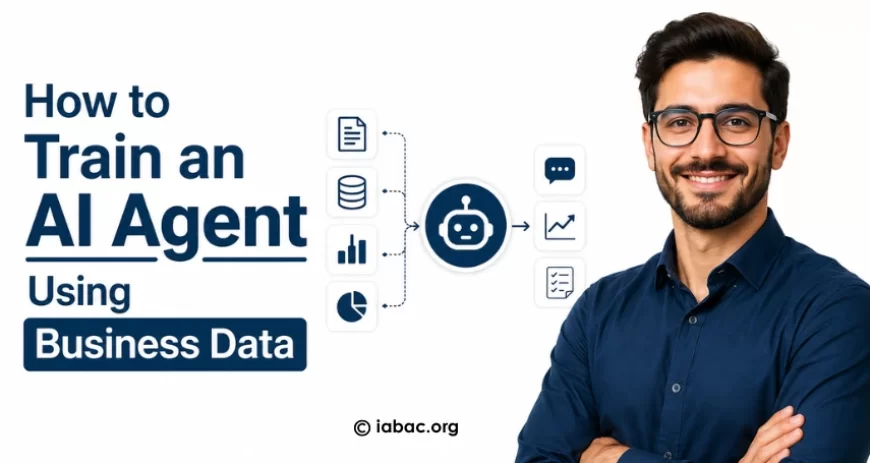
How to Train an AI Agent Using Business Data
Learn how to train AI agents using business data with RAG, fine-tuning, workflows, tools, and real-world enterprise AI use cases.

Every business is sitting on a goldmine — and most don't realize it yet.
Your CRM logs. Your support tickets. Your sales call transcripts. Your inventory records. Your internal wikis and SOPs. This pile of data that your team generates every single day is exactly what an AI agent needs to stop being generic and start being genuinely useful to your business.
The gap between a generic AI chatbot and a powerful enterprise AI agent isn't magic — it's data. The right data, structured correctly, fed into the right system. Once you understand how that works, you stop asking "should we invest in AI?" and start asking "how fast can we get this running?"
This guide walks you through everything: what an AI agent actually is, why your business data is the secret ingredient, how the training process works step by step, and how real companies are already using these systems to automate work that used to take entire teams.
Whether you're a business leader trying to understand the landscape or a technical practitioner ready to implement, this article is written for you.
What Is an AI Agent?
Let's start with the basics — but not in a boring textbook way.
An AI agent is a software system that can perceive information, make decisions, take actions, and learn from outcomes — all with minimal human intervention. Unlike a simple chatbot that replies to questions, an AI agent can do things: browse the web, query databases, send emails, update your CRM, generate reports, and trigger workflows across your tech stack.
Think of it like this: a chatbot is a very smart answering machine. An AI agent is closer to a digital employee — one that never sleeps, doesn't forget instructions, and can process thousands of tasks simultaneously.
The Core Components of an AI Agent
At its core, an AI agent has four building blocks:
1. Perception — It takes in inputs. This could be text, structured data, user commands, sensor data, or API responses.
2. Reasoning — It uses a language model (like GPT-4, Claude, or a fine-tuned open-source model) to understand the input, retrieve context, and figure out what to do next.
3. Action — It executes something. This might be calling an API, running a query, filling out a form, or generating a document.
4. Memory — It stores what it's learned or done, so it can be more useful in future interactions.
The intelligence behind that "reasoning" layer is where your business data comes in. A general-purpose LLM knows a lot about the world. But it knows nothing about your products, your pricing, your customers, or your internal processes — unless you teach it.
Why Business Data Matters for AI Agent Training
Here's a question worth sitting with: Why does ChatGPT sometimes give answers that feel slightly... off when you use it for work?
Because it was trained on the internet. Not on your business.
When someone asks your customer support AI agent "What's the refund policy for enterprise accounts signed before 2023?", a generic AI will guess. An AI agent trained on your actual policy documents, contract database, and support history will know.
That's the difference business data makes. It transforms a capable-but-generic AI into a precise, trustworthy, context-aware agent that can actually represent your company with accuracy.
The Business Case in Plain Numbers
Consider what this means operationally:
-
A support AI that understands your actual product can resolve 60–70% of tickets without human involvement.
-
A sales AI trained on your successful deal patterns can qualify leads with near-human accuracy.
-
A financial AI agent that knows your internal accounting structure can generate board-ready reports in minutes.
None of this happens with off-the-shelf AI. It only happens when you train AI agents with company data that reflects your real-world operations.
Types of Business Data You Can Use to Train AI Agents
Not all data is created equal — and not all of it is ready to use. Before you start building, you need to understand what you're working with.
Structured Data
This is your clean, organized data — the kind that lives in databases, spreadsheets, and CRM systems.
Examples:
-
Customer records (name, industry, purchase history, contract tier)
-
Sales pipeline data (deal stage, value, close probability)
-
Financial records (revenue by product, region, quarter)
-
Inventory and supply chain tables
-
HR data (roles, departments, performance metrics)
Structured data is the easiest to work with because it already has a defined schema. Your AI agent can query it, analyze it, and reason about it without much preprocessing.
Unstructured Business Data
This is where most of the intelligence actually lives — and where most businesses underestimate their own assets.
Examples:
-
Support ticket conversations
-
Sales call recordings and transcripts
-
Customer emails and chat logs
-
Internal Slack/Teams conversations
-
Meeting notes and summaries
-
Product documentation and FAQs
-
Employee training manuals and SOPs
Unstructured data requires more work to process — but it's often richer in context. A support transcript doesn't just tell you what a customer asked; it tells you how they asked, what frustrated them, and what language resonated.
Semi-Structured Data
This sits in between — data with some organization but not a rigid schema.
Examples:
-
JSON exports from APIs
-
Email headers and metadata
-
Log files from internal systems
-
Web scraped product data
Understanding your data landscape is step one. Once you know what you have, you can decide which training method is right for your situation.
Step-by-Step AI Agent Training Process
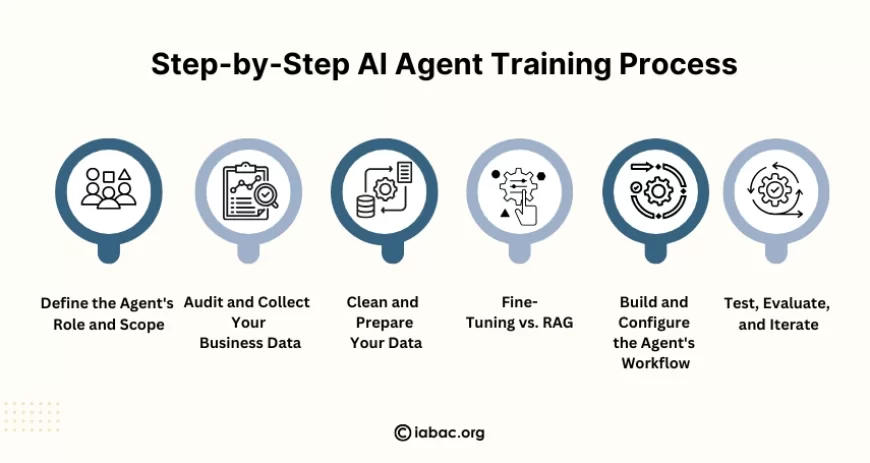
Here's where theory meets practice. Training an AI agent with your business data isn't a single step — it's a process. Let's walk through it.
Step 1: Define the Agent's Role and Scope
Before touching any data, get specific about what your AI agent will do.
Ask yourself:
-
What problem is this agent solving?
-
Who will interact with it — customers, employees, or both?
-
What actions does it need to take?
-
What information must it have access to?
A customer support agent, a sales qualification agent, and a financial reporting agent have completely different requirements. Trying to build one agent that does everything is a fast path to building one that does nothing well.
Example: A B2B SaaS company defines their agent's role as: "Handle Tier 1 support inquiries about billing, account management, and product feature questions — escalate anything requiring engineering input."
That's a clear, scoped objective. Start there.
Step 2: Audit and Collect Your Business Data
Now go find the data. Based on your agent's role, identify:
-
Which systems hold the relevant data (CRM, helpdesk, ERP, internal wikis)?
-
What format is it in?
-
How clean is it?
-
How frequently does it update?
Do a data audit. You'll often find that the data exists but is fragmented across tools. A support agent might need data from Zendesk, Confluence, your product database, and a pricing spreadsheet — all in one place.
Practical tip: Start small. Pick your highest-value, cleanest data source first. You can expand the agent's knowledge base over time.
Step 3: Clean and Prepare Your Data
Raw business data is rarely ready for AI. This step is unglamorous but critical.
Data preparation involves:
-
Removing duplicate or outdated records
-
Standardizing formats (date fields, product names, categories)
-
Redacting sensitive personal information (PII) to stay compliant
-
Breaking large documents into logical chunks
-
Tagging and labeling data for context
If you're working with unstructured text, you'll also need to convert it into a format the AI can work with — typically through a process called embedding, which we'll cover in the tools section.
Step 4: Choose Your Training Approach — Fine-Tuning vs. RAG
This is one of the most important decisions in the entire AI agent development process. Let's explain both clearly.
Fine-Tuning
Fine-tuning means taking a pre-trained language model and retraining it on your business-specific data. The model's weights — the internal parameters that determine how it thinks — actually change.
When fine-tuning makes sense:
-
You need the agent to adopt a specific tone or writing style
-
Your domain has highly specialized terminology that general models don't handle well
-
You have large volumes of labeled training examples (input-output pairs)
-
You need the model to behave consistently in a very narrow task
The downside: Fine-tuning is expensive, requires ML expertise, and doesn't update easily when your data changes. If your pricing policy changes tomorrow, your fine-tuned model doesn't know.
Retrieval-Augmented Generation (RAG)
RAG is a smarter approach for most business use cases. Instead of retraining the model, you build a knowledge base from your business data and let the AI retrieve relevant information at the time it needs to answer a question.
Here's how it works:
-
Your documents are chunked and converted into numerical representations called embeddings
-
These embeddings are stored in a vector database
-
When a user asks a question, the system finds the most relevant chunks from the database
-
Those chunks are passed to the LLM as context, and the model generates an answer grounded in your actual data
Why RAG wins for most businesses:
-
Your knowledge base updates in real time as documents change
-
No need to retrain the model
-
Much lower cost than fine-tuning
-
More transparent — you can see exactly what sources the AI used
-
Lower risk of the model "hallucinating" made-up facts
The sweet spot: Many enterprise AI agents combine both approaches — RAG for dynamic, frequently updated knowledge, and fine-tuning for consistent tone and formatting.
Step 5: Build and Configure the Agent's Workflow
Now you wire everything together. An AI agent isn't just a model — it's a system with multiple components working in sequence.
A typical AI agent workflow looks like this:
User Input → Intent Classification → Tool Selection → Data Retrieval → LLM Reasoning → Action Execution → Response
At this stage, you're defining:
-
What tools the agent can use (search, database query, email, CRM update, etc.)
-
What guardrails are in place (what it can and cannot do)
-
How escalation works when the agent can't resolve something
-
What the output format looks like
This is also where prompt engineering becomes crucial. The system prompt — the set of instructions that tells the agent how to behave — is essentially the job description for your AI employee. Write it poorly, and you get inconsistent, unreliable behavior. Write it well, and your agent operates with surprising precision.
Step 6: Test, Evaluate, and Iterate
Never deploy an AI agent you haven't tested against real scenarios.
Build a test suite that includes:
-
Happy path tests: Questions the agent should answer perfectly
-
Edge cases: Unusual queries, ambiguous language, or requests outside scope
-
Adversarial tests: Attempts to make the agent do something it shouldn't
Measure:
-
Accuracy (did it get the right answer?)
-
Groundedness (did it cite real data, or make something up?)
-
Latency (how fast did it respond?)
-
Failure rate (how often did it escalate or give up?)
Iterate based on what you find. This is not a one-time exercise — it's a continuous improvement loop.
Step 7: Deploy with Governance and Monitoring
Go-live is not the finish line. Once your AI agent is in production, you need:
-
Logging of all interactions for audit and improvement
-
Human-in-the-loop escalation for high-stakes decisions
-
Performance dashboards to track resolution rates, user satisfaction, and error patterns
-
Regular reviews of the knowledge base to keep it current
-
Access controls to ensure the agent only sees what it should
AI governance isn't optional — especially if your agent handles customer data, financial decisions, or anything regulated. Build compliance in from the start.
Tools and Technologies for AI Agent Training
You don't need to build everything from scratch. Here's the modern stack most teams use.
Language Models (The Brain)
-
OpenAI GPT-4 / GPT-4o — Industry standard, excellent reasoning
-
Anthropic Claude — Strong at nuanced reasoning and long-context tasks
-
Google Gemini — Deep integration with Google Workspace
-
Meta LLaMA 3 — Open-source, can be self-hosted for data privacy
-
Mistral — Lightweight, efficient, good for specific tasks
Vector Databases (The Memory)
These store your embeddings and power fast similarity search:
-
Pinecone — Popular managed vector DB, easy to scale
-
Weaviate — Open-source with strong filtering capabilities
-
Chroma — Great for smaller projects and prototyping
-
Qdrant — High-performance, good for production workloads
-
pgvector — If you're already on PostgreSQL, this adds vector search
Orchestration Frameworks (The Nervous System)
These connect everything together and manage the agent's decision-making:
-
LangChain — Most widely adopted framework; huge ecosystem
-
LlamaIndex — Excellent for RAG pipelines and document indexing
-
AutoGen (Microsoft) — Multi-agent systems where agents collaborate
-
CrewAI — Role-based multi-agent orchestration
-
Haystack — Enterprise-grade NLP pipelines
Data Processing Tools
-
Apache Spark — Large-scale data transformation
-
dbt — Transform data in your warehouse before feeding it to AI
-
Unstructured.io — Extract text from PDFs, DOCX, HTML, and more
-
LangChain Document Loaders — Connect to Confluence, Notion, SharePoint, Slack
Deployment and Monitoring
-
LangSmith — Tracing, evaluation, and monitoring for LangChain agents
-
Weights & Biases — ML experiment tracking
-
Helicone — LLM observability and cost tracking
-
AWS Bedrock / Azure OpenAI / GCP Vertex AI — Enterprise-grade cloud deployment with data residency options
Common Challenges in Training AI Agents with Business Data
Let's be honest about what makes this hard — because it often is.
Data Quality Issues
Garbage in, garbage out. If your CRM has inconsistent entries, your product docs are outdated, or your support transcripts are full of jargon and typos, your AI agent will reflect that. Data cleaning is non-negotiable and often takes longer than expected.
Data Silos
Most enterprises have data scattered across dozens of systems that don't talk to each other. Building a unified knowledge base means solving an integration problem before you solve an AI problem.
Keeping Knowledge Current
Business data changes constantly. New products launch. Policies update. Prices change. If your agent's knowledge base doesn't update accordingly, it starts giving wrong answers — and users lose trust fast.
Hallucination Risk
Even well-configured AI agents can occasionally generate confident-sounding answers that are just... wrong. RAG significantly reduces this risk by grounding responses in retrieved documents, but it doesn't eliminate it. Monitoring and human review remain essential.
Security and Privacy
Training an AI agent with business data means giving a system access to sensitive information. You need to think carefully about:
-
Who can access the agent's knowledge base
-
Whether customer PII is properly anonymized
-
How data is stored and transmitted
-
Regulatory compliance (GDPR, HIPAA, SOC 2, etc.)
Stakeholder Buy-In
Technical challenges aside, organizational resistance is one of the biggest blockers. Teams worry about job displacement. Leaders question ROI. IT pushes back on new vendors. Building an effective AI agent program requires change management as much as technical execution.
Best Practices for Training AI Agents with Business Data
Based on what actually works in enterprise deployments, here's what to follow.
Start with a high-value, narrow use case. Resist the temptation to build a universal AI agent. Pick one specific workflow, prove the value, then expand. Success in a small scope builds momentum and credibility.
Invest in data quality before model quality. A mediocre model on clean, relevant data outperforms a state-of-the-art model on messy data. Spend at least as much time on data preparation as you do on model configuration.
Use RAG as your default approach. Unless you have a compelling reason for fine-tuning (specialized domain terminology, massive labeled datasets, highly specific tone requirements), RAG is more practical, more maintainable, and good enough for most business applications.
Version your knowledge base. Treat your vector database like a codebase. Know when content was added, who approved it, and when it was last reviewed. This makes auditing and rollback possible when something goes wrong.
Build feedback loops. When users flag a wrong answer, that's training data. Create mechanisms to capture corrections and continuously improve the agent's accuracy.
Design for failure. Every AI agent will hit questions it can't answer well. Design the escalation path before you need it. A graceful handoff to a human is always better than a confident wrong answer.
Document your prompts. System prompts are infrastructure. Version-control them, review changes, and understand the downstream impact before modifying them in production.
Real-World Use Cases: AI Agents Trained on Business Data
Customer Support Automation at Scale
A mid-sized e-commerce company trained an AI agent on three years of Zendesk tickets, their product catalog, shipping policy documents, and return procedures. The agent now handles 68% of incoming support volume autonomously, with average resolution time dropping from 4 hours to under 3 minutes. Escalation to human agents is seamless — and when it happens, the human sees the full conversation context and a suggested resolution drafted by the Artificial Intelligence.
Sales Intelligence and Lead Qualification
A B2B software company trained an AI agent on historical CRM data, won/lost deal analysis, and ideal customer profiles. When a new inbound lead arrives, the agent scores it, identifies the most similar successful deals, suggests an outreach approach, and pre-populates the CRM with enriched data from public sources. Sales reps spend less time on administrative work and more time on conversations that actually close.
HR and Onboarding Automation
A financial services firm trained an AI agent on their employee handbook, benefit documentation, IT policy guides, and 2,000+ historical HR ticket resolutions. New employees can ask any onboarding question in natural language and get an accurate, policy-grounded answer instantly. HR ticket volume dropped by 45% in the first quarter of deployment.
Financial Reporting and Business Intelligence
A retail chain built an AI agent connected to their ERP, sales database, and budgeting tools. Business unit leaders can now ask questions in plain English — "How did Q1 margin compare to plan by category?" — and get structured answers with supporting data, visualized as charts, in seconds. What used to take a data analyst two hours now takes ninety seconds.
Legal Contract Analysis
A procurement team trained an AI agent on thousands of vendor contracts to extract key terms, flag non-standard clauses, identify renewal dates, and surface risk factors. The agent reduced contract review time by over 70% and helped identify three million dollars in overlooked auto-renewal clauses in the first six months.
The Future of AI Agents in Business
We're still in the early innings. The capabilities you see today are genuinely impressive — but the trajectory is remarkable.
Multi-Agent Systems
The next major evolution is agents working together. Imagine a sales AI that triggers a legal AI to review a contract, which notifies a finance AI to approve pricing, which then updates the CRM — all without a human touching it. Multi-agent orchestration frameworks like AutoGen and CrewAI are making this possible today at the prototype level. In two to three years, it will be standard enterprise architecture.
Agents with Long-Term Memory
Today's agents are largely stateless — they start fresh each conversation. Emerging memory architectures are changing this. Agents that remember your preferences, past decisions, and historical context will feel less like tools and more like colleagues.
Tighter Integration with Business Systems
The current generation of AI agents often requires custom integration work. The next generation will have native connectors to every major enterprise platform — SAP, Salesforce, ServiceNow, Workday — making deployment dramatically faster and cheaper.
Proactive Rather Than Reactive
Most AI agents today respond to questions. The future is agents that initiate — spotting anomalies in your data, flagging risks before they materialize, and suggesting actions before anyone asks. This shift from reactive to proactive intelligence is where AI automation for business gets truly transformative.
Regulation and Governance Will Mature
As AI agents take on more consequential decisions, regulatory frameworks will follow. The EU AI Act is already setting precedent. Enterprises that build strong governance practices now — explainability, audit trails, human oversight — will be better positioned when compliance requirements tighten.
Training an AI agent with your business data is not a futuristic ambition — it's a practical, implementable initiative that businesses of every size are executing today.
The recipe is straightforward, even if the execution requires care: define a clear use case, understand your data landscape, choose the right training approach (RAG for most, fine-tuning for specialized needs), build a robust workflow, test rigorously, and monitor continuously.
The businesses winning with AI agents right now aren't necessarily the ones with the biggest budgets or the most advanced models. They're the ones that understood the value of their own data, took a disciplined approach to building on top of it, and committed to iterating rather than seeking perfection on day one.
Your data is your competitive moat. An AI agent is the mechanism that turns that moat into a measurable business advantage.
For professionals looking to deepen their expertise in this space — from understanding the LLM training process to designing full enterprise AI agent architectures — industry-recognized programs and certifications (such as those offered by IABAC and similar bodies) provide structured pathways to build credible, job-ready skills in AI and data science. As the field matures, having verified expertise becomes increasingly valuable for both practitioners and the organizations they serve.
The question is no longer whether to build AI agents. It's how fast you can do it well.